Description
UGREEN 90264 M.2 NVMe/SATA SSD Enclosure USB-C 10Gbps USB 3.2 Gen 2 :
Buying Guide & Review
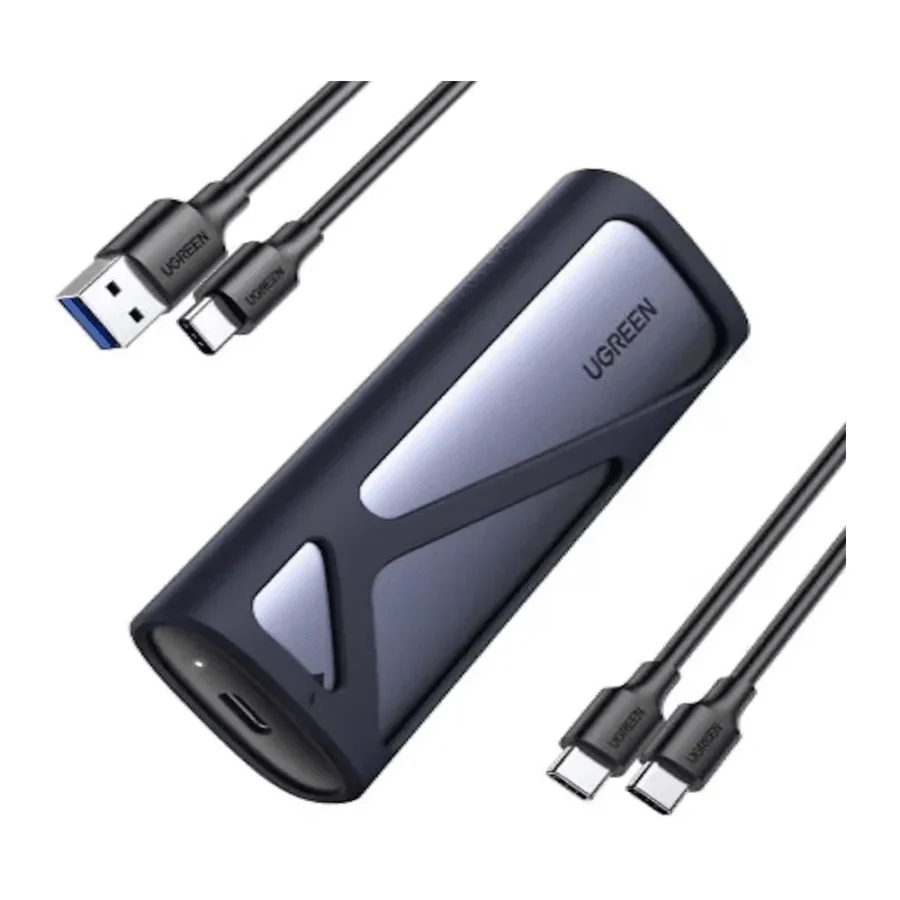
Upgrade your laptop or desktop to a bigger SSD and you are left with a question: what do you do with the old M.2 drive? Throwing it in a drawer wastes perfectly good storage. The UGREEN 90264 M.2 NVMe/SATA SSD Enclosure USB-C 10Gbps USB 3.2 Gen 2 answers that neatly, turning a spare M.2 stick into a fast, pocket-sized external drive that plugs into almost anything.
It accepts both NVMe and SATA M.2 drives in every common length, which makes it one of the more flexible enclosures you can keep in a bag or on a workbench. Let us look at how it works and where it shines.
1. Why an M.2 Enclosure Makes Sense
Give Old SSDs a Second Life
When you move to a larger or faster internal drive, the old one still has years of life left. Put it in the 90264 and it becomes portable storage for backups, file transfers or carrying projects between home and work.
Build Your Own Portable SSD
Buying an enclosure and an M.2 drive separately often costs less than a branded portable SSD of the same size, and you can pick exactly the capacity you want. If you ever need more space, swap in a bigger drive and keep the enclosure.
2. Design and Drive Support
NVMe and SATA in One Case
Many enclosures handle only NVMe or only SATA M.2 drives. The 90264 supports both, and accepts M-Key and B+M Key modules. That means you rarely need to check which type of M.2 drive you have before using it.
Every Common Length
It takes 2230, 2242, 2260 and 2280 drives. That covers the tiny 2230 drives found in some handhelds and thin laptops, the shorter drives from older ultrabooks, and the standard 2280 size used in most desktops.
3. UGREEN 90264 Specs Explained
USB 3.2 Gen 2 at 10Gbps
The enclosure connects over USB 3.2 Gen 2 with bandwidth of up to 10Gbps through a USB-C connector. For NVMe drives, that is roughly double what older 5Gbps USB 3.0 enclosures can manage, so file copies finish much sooner.
PCIe 3.0 Bridge
Inside, the enclosure supports PCIe 3.0 NVMe drives. Newer Gen4 drives also work, but the USB link is the real limit, so you do not gain anything by putting an expensive Gen4 drive in here purely for speed.
4. Real-World Speed
NVMe vs SATA Inside the Case
With an NVMe drive fitted and a 10Gbps port on your computer, the enclosure can run close to the USB 3.2 Gen 2 limit. A SATA M.2 drive will be capped at SATA speeds, which is still far quicker than a portable hard drive.
Match Your Ports
For the best results, plug the enclosure into a USB 3.2 Gen 2 or faster USB-C port. On an older USB 3.0 or USB 2.0 port it still works, but at the lower speed of that port.
5. Everyday Uses
Backups and File Transfers
Use it to keep a copy of your important folders, carry large video projects between machines, or hand over a batch of files to a client without waiting on a slow upload.
Cloning and Data Recovery
The enclosure is also handy for cloning a new SSD before installing it in a laptop, or for pulling files off a drive from a laptop that no longer boots. Technicians and hobbyists will find it useful on the bench.
6. Pakistan Buyer Perspective
Beating Slow Uploads
Uploading tens of gigabytes to the cloud can take hours on many home and office connections. A fast USB-C SSD in your pocket is often the quickest way to move large projects around the city.
Heat and Safe Handling
NVMe drives can get warm during long copies, especially in summer. Place the enclosure on a hard surface rather than a sofa cushion, and always eject it safely before unplugging. If power cuts are common where you work, keep your laptop charged or your desktop on a UPS during big transfers.
7. UGREEN 90264 Price in Pakistan and Value
Cheaper Than a Branded Portable SSD
Pairing the 90264 with a spare or budget M.2 drive gives you fast portable storage at a fraction of the cost of many premium external SSDs. If you already have a spare drive, the value is even better.
Mind the Warranty Window
This listing carries a 7-day replacement or refund warranty. When comparing the UGREEN 90264 price in Pakistan with other enclosures, the dual NVMe and SATA support is the key advantage worth weighing.
8. Who Should Buy the UGREEN 90264?
Great For
Laptop and desktop owners who have upgraded their SSD, students and freelancers who carry large files, technicians cloning or recovering drives, and anyone who wants a custom-size portable SSD.
Consider Something Else If
You want to run a very fast Gen4 drive at full speed externally, which needs a 20Gbps or 40Gbps enclosure, or you need a sealed, rugged, ready-made drive with a long warranty.
Conclusion
The UGREEN 90264 M.2 NVMe/SATA SSD Enclosure USB-C 10Gbps USB 3.2 Gen 2 is a versatile little box. It accepts NVMe and SATA M.2 drives, supports M-Key and B+M Key modules from 2230 to 2280, and connects over a 10Gbps USB-C link.
Whether you are reusing an old drive, backing up a laptop or rescuing data from a dead machine, it is a practical accessory that earns its place in any tech bag.
FAQs
1. Does the UGREEN 90264 support both NVMe and SATA M.2 drives?
Yes. It supports NVMe and SATA M.2 SSDs with M-Key or B+M Key.
2. Which SSD sizes fit?
It supports 2230, 2242, 2260 and 2280 length drives.
3. How fast is it?
It uses USB 3.2 Gen 2 with up to 10Gbps of bandwidth. Real speed depends on the SSD inside and the port you use.
4. Does it work with phones and consoles?
It works as a standard USB drive, so any device that supports USB mass storage and the drive’s file format should be able to use it.
5. What is the UGREEN 90264 price in Pakistan?
Prices change with the market. Check the current UGREEN 90264 price in Pakistan on this page or message MHK Tech Zone on WhatsApp for the latest rate.


Reviews
There are no reviews yet.