Description
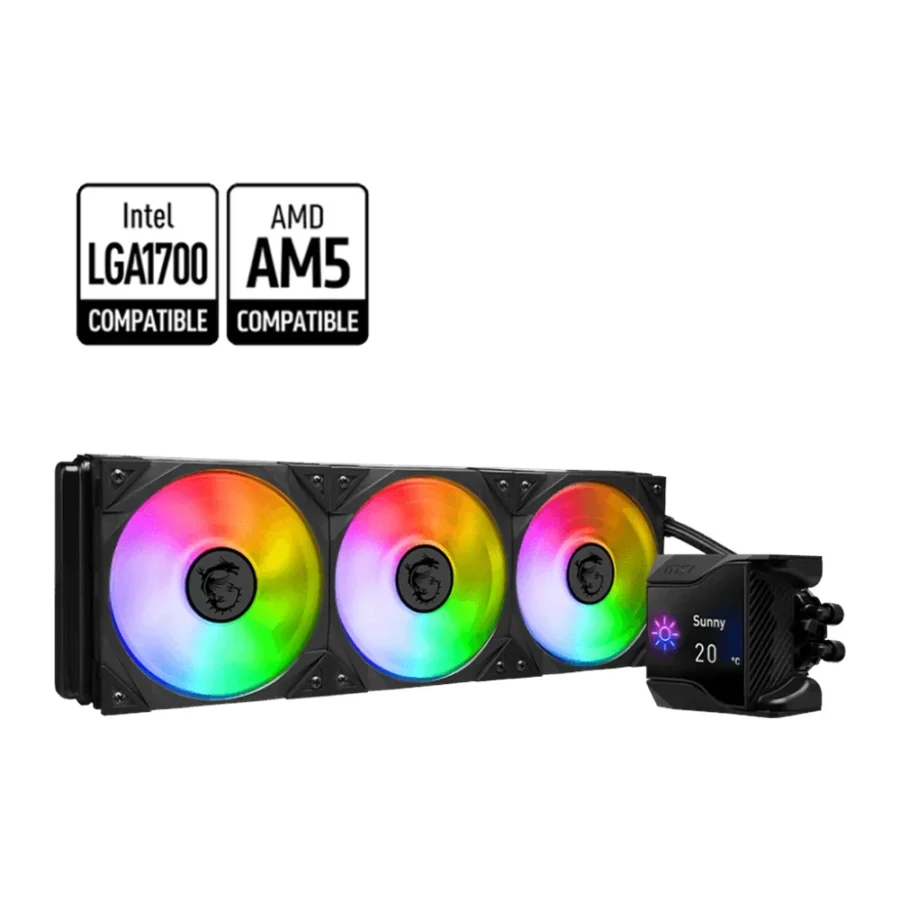
MSI MPG CoreLiquid D360 360mm ARGB AIO Liquid CPU Cooler Black :
Buying Guide & Review
Once you move to a high-core-count Intel or Ryzen processor, the stock cooler conversation ends and the real question begins: which cooler will keep this chip calm through a Pakistani June? The MSI MPG CoreLiquid D360 360mm ARGB AIO Liquid CPU Cooler Black is MSI’s answer for builders who want a full-size radiator, proper fans and a little personality on top of the CPU.
It is not a bare-bones AIO. MSI has fitted a 2.4-inch IPS display to the pump head, a small fan inside the block itself and TORX Fan 4.0 blades on the radiator. Below, we break down what each of those pieces does, who benefits from them and what to check before you order one.
1. Why the MSI MPG CoreLiquid D360 Stands Out
A Full 360mm Radiator
A 360mm radiator gives heat three fans’ worth of surface to escape through. That extra area is what separates a cooler that simply copes from one that holds steady when a render, a long compile or a heavy open-world game keeps the processor loaded for hours. For flagship-class chips, 360mm is the size most builders should be aiming for.
Part of MSI’s MPG Family
The MPG name sits in the upper-middle of MSI’s gaming range. If your motherboard, graphics card or case already carries MSI branding, this cooler slots into that ecosystem visually and makes the whole build look planned rather than assembled from random parts.
2. Design & Build Quality
The 2.4-Inch IPS Screen
The pump head carries a 2.4-inch IPS display that you can customise. Many owners use it to show CPU temperature so they can see at a glance how the system is behaving, while others prefer a logo, an image or a simple animation that matches the rest of the setup. Either way, it turns the most visible part of the cooler into something useful.
A Fan Inside the Water Block
One detail many buyers miss is the 60mm TORX Fan 3.0 built into the water block. Its job is to push air across the area around the CPU socket, where the power delivery components on the motherboard sit. Liquid coolers normally leave that zone with little direct airflow, so this small fan helps fill a gap that air coolers used to cover naturally.
3. Cooling Performance & Fans
TORX Fan 4.0 on the Radiator
MSI’s TORX Fan 4.0 design pairs blades that work together to focus airflow and static pressure through dense radiator fins. Pressure matters more than raw airflow on a radiator, because the air has to be forced through a tightly packed core rather than into open space.
Built for Sustained Loads
We will not quote temperature numbers here, because results depend heavily on your processor, case and room. What we can say is that a 360mm AIO with pressure-focused fans is the right class of cooler for modern high-end CPUs that boost aggressively and draw a lot of power when pushed.
4. Compatibility & Installation
Intel LGA1700 and AMD AM5
The listed socket support covers Intel LGA1700, used by 12th, 13th and 14th Gen Core processors, and AMD AM5, which covers Ryzen 7000, 8000 and 9000 series chips. Those are the two platforms most new builds in Pakistan are based on right now.
Check Your Case First
A 360mm radiator needs a case with a 360mm mounting position, either at the top or at the front. Before buying, measure the space and check your case’s specification sheet. Top mounting also needs enough clearance above the RAM and the motherboard’s heatsinks, so tall memory kits are worth double-checking.
5. Control, Noise & Software
Fans and Pump Tuned Separately
MSI lets you control fan speed and pump speed independently. That means you can let the fans ramp only when the CPU genuinely gets warm, while keeping the pump steady, or set a relaxed profile for web browsing and a more aggressive one for gaming. Separate control is the key to a PC that is quiet at idle but still cools properly under load.
Setting Up the Display
The screen and lighting are configured through MSI’s software on Windows. Take a few minutes after installation to set a sensible fan curve and pick what the display shows.
6. Pakistan Market Perspective
Summer Heat and Ambient Temperature
Room temperature in many Pakistani homes climbs well past what cooler reviews abroad are tested at. A larger radiator gives you margin for those afternoons, and the in-block fan helps keep motherboard power components cooler when the case air itself is warm. Pair the cooler with a case that has good intake and you will have a system that stays composed in peak summer.
Power Cuts and UPS Backup
During load-shedding, a PC running on a UPS should shut down cleanly, so give yourself time to save work. Liquid coolers draw little power themselves, but the pump must be running whenever the CPU is, so never set the pump to switch off entirely in software.
7. MSI MPG CoreLiquid D360 Price in Pakistan & Value
Where It Fits
This cooler sits in the premium end of the AIO market. You are paying for three things beyond basic cooling: the IPS screen, the socket-area fan and MSI’s TORX fans. If none of those matter to you, a simpler 360mm AIO will cool almost as effectively for less.
Warranty Support
The unit comes with a 1 year local warranty covering replacement or refund, which gives buyers some peace of mind on a product with moving parts like a pump and fans.
8. Who Should Buy the MSI MPG CoreLiquid D360?
A Great Fit For
Owners of Core i7, Core i9, Ryzen 7 or Ryzen 9 processors, builders creating an all-MSI system, and anyone who wants live temperature readouts right on the CPU block.
Consider Another Cooler If
Your case cannot fit a 360mm radiator, you are running a modest six-core chip that a good air cooler can handle, or you would rather put the extra money into a better graphics card.
Conclusion
The MSI MPG CoreLiquid D360 360mm ARGB AIO Liquid CPU Cooler Black combines a large radiator, TORX Fan 4.0 blades, a 2.4-inch IPS display and a clever 60mm fan inside the block that looks after the socket area. With LGA1700 and AM5 support, it covers the platforms most local builders are using today.
It is a premium cooler with premium touches, and it makes the most sense for high-end processors in warm rooms. If that describes your build, it deserves serious consideration.
FAQs
1. Which sockets does the MSI MPG CoreLiquid D360 support?
It supports Intel LGA1700 and AMD AM5, covering Intel 12th to 14th Gen Core and AMD Ryzen 7000, 8000 and 9000 desktop processors.
2. What is the display on the pump for?
The 2.4-inch IPS screen can be customised to show system information such as CPU temperature, or your own images and animations.
3. Why is there a fan inside the water block?
The 60mm TORX Fan 3.0 in the block moves air over the area around the CPU socket, helping cool the motherboard’s power delivery components.
4. Can I control the pump and fans separately?
Yes. Fan speed and pump speed can be controlled independently, so you can balance noise and cooling to suit your use.
5. What is the MSI MPG CoreLiquid D360 price in Pakistan?
Rates move with the market and exchange rate. See the current MSI MPG CoreLiquid D360 price in Pakistan on this page or message MHK Tech Zone on WhatsApp for today’s rate.
Reviews
There are no reviews yet.