Description
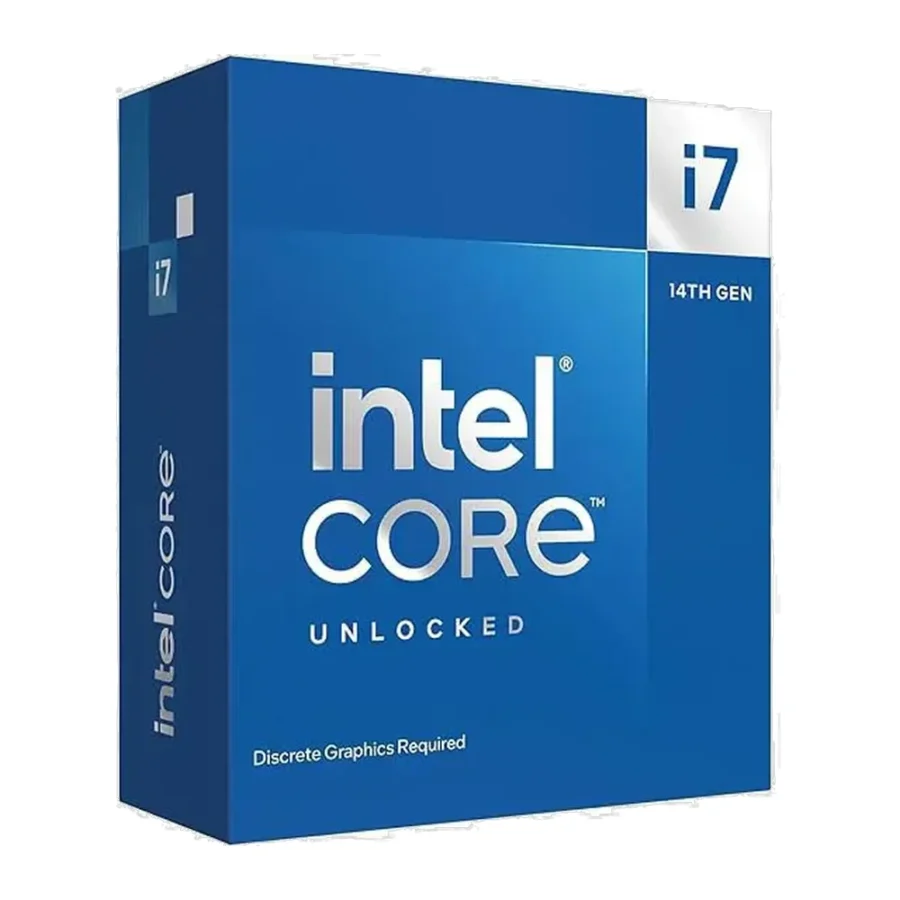
Intel Core i7-14700KF 20-Core LGA1700 Desktop Processor :
Buying Guide & Review
Some processors are bought for bragging rights. Others are bought because they quietly do everything you ask of them for years. The Intel Core i7-14700KF 20-Core LGA1700 Desktop Processor belongs firmly in the second group. It brings twenty cores and twenty-eight threads to the LGA1700 platform, keeps the multiplier unlocked, and drops the integrated graphics to hit a friendlier price than its K sibling.
For Pakistani builders who already own a graphics card, or who are planning a proper gaming rig from the start, that trade-off is easy to live with. In this guide we look at what the chip offers, which boards and parts suit it, how to keep it cool through a Karachi or Multan summer, and whether it fits your budget.
1. Why the Intel Core i7-14700KF Stands Out
Twenty Cores for the Price of an i7
The headline here is core count. Twenty cores used to be territory reserved for flagship chips, and the 14700KF brings it into the Core i7 tier. That extra muscle shows up when you game while a stream encoder, a browser full of tabs and a voice chat all run in the background.
The KF Trade-Off
The F in the name tells you there is no built-in graphics. The K tells you the chip is unlocked. Put together, you get the full enthusiast feature set minus a display engine that most gaming builds never use, because a dedicated graphics card does all the work anyway.
2. Hybrid Core Architecture
8 Performance-cores Up Front
Eight Performance-cores handle the jobs that care about responsiveness: game engines, Photoshop filters, compiling code and anything else sensitive to single-thread speed. These are the cores that reach the 5.6GHz turbo figure when conditions allow.
12 Efficient-cores Behind Them
Twelve Efficient-cores sit alongside and absorb background work. Windows scheduling pushes updates, downloads, antivirus scans and similar tasks onto them, which leaves the P-cores free for whatever you are actively doing. The result is a system that feels smooth even when a lot is happening at once.
3. Intel Core i7-14700KF Specs Explained
3.4GHz Base, 5.6GHz Turbo
The P-cores start from a 3.4GHz base and can turbo up to 5.6GHz. The gap between those numbers is where cooling and motherboard power delivery matter, because the chip will hold higher clocks for longer when it has thermal and electrical headroom.
28 Threads in Total
Only the Performance-cores support Hyper-Threading, which is why twenty cores add up to twenty-eight threads rather than forty. For rendering, video exports and heavy multitasking, that thread count is a big step up from older eight-core i7 chips.
Unlocked Multiplier
Enthusiasts on a Z-series board can adjust multipliers and voltages. Most owners will leave it at stock, which is perfectly sensible, but the option is there if you like to tune.
4. Platform and Compatibility
LGA1700 Motherboards
The chip uses the LGA1700 socket, shared with Intel’s 12th, 13th and 14th generation desktop processors. Z790 and Z690 boards unlock overclocking, while B760 and B660 boards run it at stock speeds. Older 600-series boards may need a BIOS update before they recognise a 14th Gen CPU, so ask about the BIOS version before you buy a board.
DDR4 or DDR5 Memory
LGA1700 boards come in DDR4 and DDR5 versions. If you are carrying over a good DDR4 kit from an older build, a DDR4 board can save money today. If you are starting fresh, DDR5 is the better long-term choice.
A Graphics Card Is Mandatory
With no integrated graphics, the motherboard’s HDMI and DisplayPort outputs will not work with this chip. You need a discrete GPU to get any picture at all, which also means you cannot fall back on onboard video if your card ever goes for repair.
5. Cooling for Pakistani Summers
Budget for a Serious Cooler
A twenty-core unlocked chip produces real heat under sustained load, and there is no stock cooler to rely on. A strong dual-tower air cooler or a 240mm or 360mm AIO liquid cooler is the right tier here. When room temperatures climb into the high thirties, that extra cooling capacity is what keeps boost clocks steady.
Case Airflow Matters Too
Pair the cooler with a mesh-front case and at least two intake fans. Dust builds up quickly in most Pakistani cities, so fan filters and a clean-out every few months help the whole system run cooler and quieter.
6. Gaming and Creator Workloads
High-Refresh Gaming
Paired with an upper mid-range or high-end graphics card, the 14700KF is well suited to high-refresh 1080p and 1440p gaming. Fast P-cores keep frame delivery consistent in CPU-heavy titles and competitive shooters.
Streaming, Editing and Freelance Work
Many buyers here game in the evening and freelance during the day. The high thread count makes this chip a strong fit for video editing, 3D work, programming and running virtual machines, so one PC can comfortably cover both jobs.
7. Power, UPS and Value
Plan the Power Supply
An unlocked chip like this deserves a quality power supply from a known brand with enough headroom for your graphics card. Unstable voltage is common, so a good PSU is protection as much as it is capacity.
Thinking About Load-Shedding
A full 14700KF gaming system draws more than a basic office PC, so check that your UPS or inverter can carry the load long enough to save your work when the power cuts out. Setting a sensible power profile in Windows also helps during long outages.
Where It Sits on Value
Compared with the i7-14700K, the KF gives up only the integrated graphics, which makes it the smarter pick for anyone who will always run a dedicated GPU.
8. Who Should Buy the Intel Core i7-14700KF?
A Great Fit For
Gamers building a high-end LGA1700 system, streamers, freelancers who edit or render, and anyone upgrading from a 12th or 13th Gen chip on a board they already own.
Consider Another Processor If
You want onboard video as a backup, in which case the i7-14700K makes more sense, or you are building a light office PC where a Core i5 would be plenty.
Conclusion
The Intel Core i7-14700KF 20-Core LGA1700 Desktop Processor delivers a serious amount of computing power without flagship pricing. Eight P-cores for speed, twelve E-cores for background work, a 5.6GHz turbo and an unlocked multiplier make it a versatile heart for gaming and productivity builds.
Give it a capable cooler, a solid power supply and a well-ventilated case, and it will handle demanding work for years. Just remember that a graphics card is part of the deal from day one.
FAQs
1. Does the Intel Core i7-14700KF have integrated graphics?
No. KF models have no integrated graphics, so you will need a dedicated graphics card to get a display output.
2. Which motherboards support the 14700KF?
LGA1700 boards with Intel 600 or 700 series chipsets. Z790 and Z690 boards allow overclocking, and some older boards may need a BIOS update first.
3. Does it come with a cooler?
No stock cooler should be expected with this unlocked chip. Plan for a strong air cooler or an AIO liquid cooler.
4. Can I use DDR4 memory with it?
Yes, as long as your LGA1700 motherboard is a DDR4 model. DDR5 boards need DDR5 memory.
5. What is the Intel Core i7-14700KF price in Pakistan?
Processor rates change with the dollar and with stock arrivals. See the current Intel Core i7-14700KF price in Pakistan on this page or message MHK Tech Zone on WhatsApp for the latest rate.


Reviews
There are no reviews yet.