Description
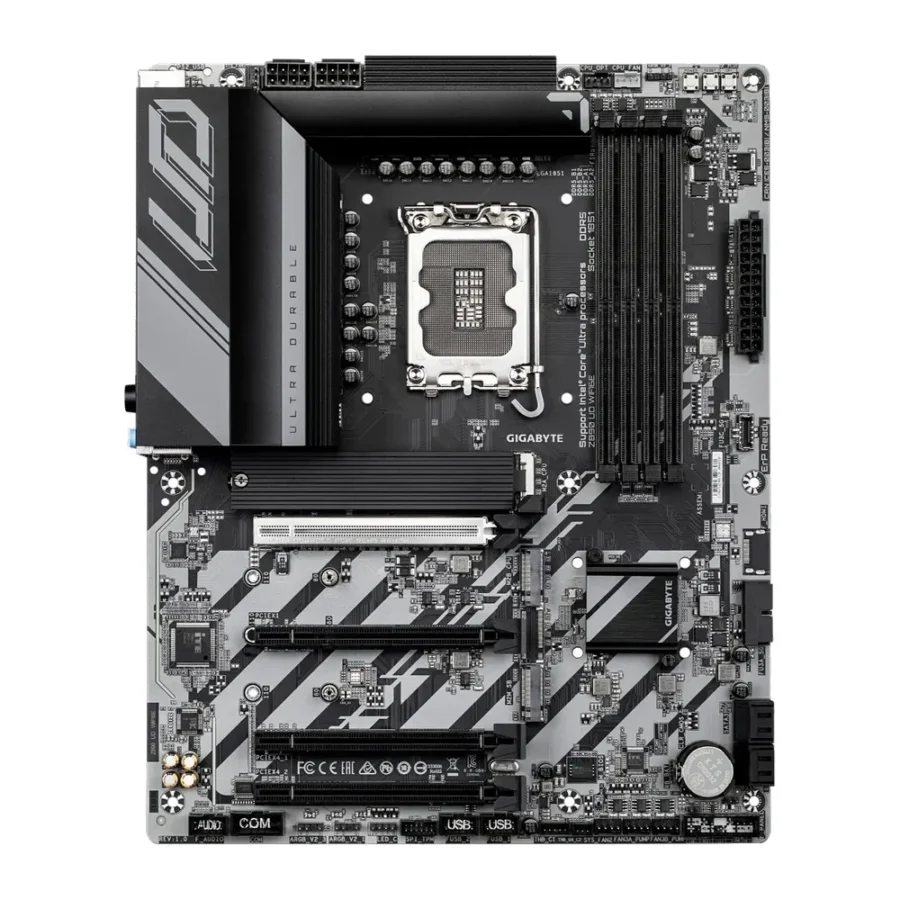
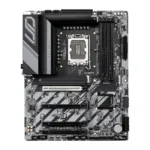
Gigabyte Z890 UD WiFi6E Intel LGA1851 DDR5 ATX Motherboard :
Buying Guide & Review
Z890 is Intel’s high-end chipset for the Core Ultra Series 2 generation, and the Gigabyte Z890 UD WiFi6E Intel LGA1851 DDR5 ATX Motherboard is one of the more accessible ways into that platform. It keeps the overclocking-friendly Z890 chipset while trimming the extras that usually push flagship boards well past what most builders need.
For anyone who wants genuine Z890 performance without a flagship price tag, this board deserves a proper look. Here is what it offers and where it fits into a build.
1. Why the Gigabyte Z890 UD WiFi6E Is a Smart Choice
Z890 for Core Ultra Series 2
This board supports Intel’s Core Ultra Series 2 processors on the Z890 chipset, which unlocks CPU and memory overclocking that lower-tier boards on the same socket do not offer. For builders who like to tune their system rather than run everything at stock, that flexibility is the entire reason to pick Z890 over B860.
The UD Series Approach
Gigabyte’s UD, or Ultra Durable, series focuses on solid fundamentals rather than flashy extras, which suits builders who want Z890 features without paying for RGB and styling they will not use. It is a straightforward, no-nonsense way to get flagship-chipset capability.
2. Design & Build of the Z890 UD WiFi6E
Digital Twin 12+1+2 Phase VRM
A Digital Twin 12+1+2 phase VRM design gives the board solid power delivery headroom, built with digital power management for more precise control than older analogue designs. That precision helps the board respond quickly to sudden load changes, such as jumping from idle to a demanding game.
Room for a Full-Size Build
The full ATX layout leaves comfortable space for cable routing and a large air or liquid cooler, which makes assembly noticeably easier than working inside a compact case.
3. Gigabyte Z890 UD WiFi6E Specs Explained
DDR5 Up to 9200MHz With XMP
Four DDR5 DIMM slots support speeds up to 9200MHz with XMP profiles, giving genuine headroom for fast memory kits rather than a spec sheet number you can never actually reach. That headroom is particularly useful for gamers chasing every bit of extra frame consistency.
Triple M.2 With PCIe 5.0
Three M.2 slots are included, with one running at PCIe 5.0 x4 for the fastest available NVMe drives, and the other two covering additional fast storage. Splitting storage across three drives also makes it easier to keep the operating system separate from a growing games library.
4. Gaming Performance on the Z890 UD WiFi6E
Z890 Headroom Put to Use
A capable VRM and genuine DDR5 overclocking support mean this board lets a strong Core Ultra Series 2 processor run at its intended speeds without holding back gaming or productivity performance.
A Sensible Step Up From B860
For builders who found a B860 board’s overclocking ceiling limiting, moving to this Z890 UD board opens up meaningfully more tuning headroom on the same LGA1851 socket.
5. Wi-Fi 6E, 2.5GbE LAN & Thunderbolt 4
Wi-Fi 6E Built In
Wi-Fi 6E is onboard for a cleaner wireless connection on the less congested 6GHz band, useful in flats and apartment blocks where 2.4GHz and 5GHz networks tend to be crowded from neighbouring routers.
Thunderbolt 4 for Expansion
Thunderbolt 4 support on the rear I/O adds fast external storage and display options that many boards at this price point leave out entirely.
6. Pakistan Market Perspective
Power Delivery That Handles Local Voltage Swings
A digitally managed VRM tends to cope better with the voltage fluctuations that come with mains power and UPS switchovers, which is a real consideration through Pakistan’s hot summer months and the frequent short outages that accompany them.
A Genuine Upgrade Platform
With PCIe 5.0 storage and real memory overclocking headroom, this board leaves room to add faster components later rather than needing a full platform change.
7. Gigabyte Z890 UD WiFi6E Price in Pakistan & Value
Flagship Chipset, Sensible Pricing
Z890 boards can get expensive fast once you move into flagship AORUS territory, and this UD-series option keeps the core overclocking features while cutting unnecessary extras.
What You Actually Get for the Money
Checking the Gigabyte Z890 UD WiFi6E price in Pakistan against its spec sheet, genuine 9200MHz DDR5 support, PCIe 5.0 storage and Thunderbolt 4 stand out as real, usable value.
8. Who Should Buy the Z890 UD WiFi6E?
A Great Fit For
Builders who want genuine Z890 overclocking headroom without flagship pricing, and anyone who values Thunderbolt 4 and fast DDR5 support over RGB lighting and cosmetic extras.
Consider Another Board If
You want a lower-cost B860 board and do not plan to overclock, or you are chasing the absolute highest-end AORUS feature set.
Conclusion
The Gigabyte Z890 UD WiFi6E Intel LGA1851 DDR5 ATX Motherboard makes genuine Z890 performance accessible: DDR5 up to 9200MHz, PCIe 5.0 storage, a solid Digital Twin VRM, Wi-Fi 6E and Thunderbolt 4 all come together on a board that keeps its focus on fundamentals.
For builders who want real overclocking headroom on Intel’s current platform without stepping up to a flagship-priced board, this is a genuinely sensible pick.
FAQs
1. Is the Gigabyte Z890 UD WiFi6E good for gaming?
Yes. Its Z890 chipset, solid VRM and fast DDR5 support make it a strong base for gaming builds using Intel Core Ultra Series 2 processors.
2. Which processors does it support?
It uses the LGA1851 socket and supports Intel Core Ultra Series 2 desktop processors.
3. How fast can the memory run?
Four DDR5 DIMM slots support speeds up to 9200MHz with XMP profiles applied.
4. Does it have Thunderbolt 4?
Yes, Thunderbolt 4 is included on the rear I/O panel, alongside Wi-Fi 6E and 2.5GbE LAN.
5. What is the Gigabyte Z890 UD WiFi6E price in Pakistan?
Prices shift with stock and the exchange rate. Check the current Gigabyte Z890 UD WiFi6E price in Pakistan on this page or message MHK Tech Zone on WhatsApp for the latest rate.

Reviews
There are no reviews yet.