Description
Gigabyte C201 Panoramic Ice White ARGB Mid Tower Case :
Buying Guide & Review
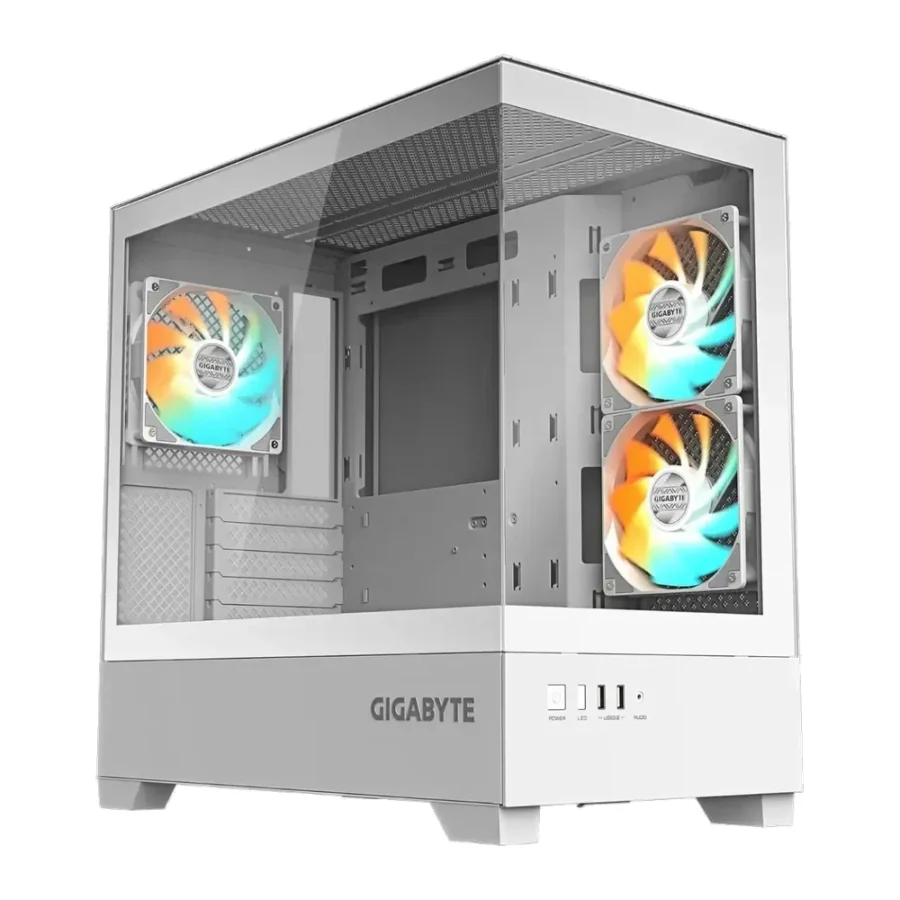
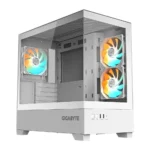
Some cases are bought for their spec sheet. Others are bought because the owner wants to walk past the desk and smile at the build. The Gigabyte C201 Panoramic Ice White ARGB Mid Tower Case firmly belongs in the second group, without ignoring the first. It wraps a white mid-tower in tempered glass on the front and side, drops in three ARGB fans that sync with Gigabyte RGB Fusion, and still leaves room for a 360mm radiator.
“Ice” is Gigabyte’s name for the white edition of the C201 Panoramic, and it is aimed at builders who treat their PC as part of the room’s décor. Here is what the case brings, what to plan for, and whether it suits a build in Pakistan.
1. Why the Gigabyte C201 Panoramic Ice Catches the Eye
Glass on Two Sides
With tempered glass on both the front and the side, the C201 Panoramic Ice gives an almost uninterrupted view of the hardware inside. It is the kind of case that makes a white graphics card, white RAM and a tidy cable job look their best.
Lighting That Works With Your Board
The three pre-installed ARGB fans support Gigabyte RGB Fusion. If you pair the case with a Gigabyte motherboard, you can manage fan lighting from the same software as the board’s own effects, keeping the colour scheme consistent across the whole system.
2. Design & Build
A Snow-White Mid Tower
The white finish is the whole point of the Ice edition. It sets a bright, clean backdrop for a themed build and pairs naturally with white peripherals and a light desk setup.
Mid Tower Footprint
Despite its showcase design, the C201 Panoramic Ice stays a mid tower. It fits a standard desk comfortably and does not demand the floor space of a full tower.
3. Cooling & Airflow
Three ARGB Fans Included
Three ARGB fans come installed from the factory, providing both lighting and a starting level of airflow. For a first build that means fewer extra purchases and a system that is ready to run on day one.
360mm Radiator Support
If you want liquid cooling, the case supports radiators up to 360mm. A 360mm AIO is a strong match for a showcase build, keeping a powerful processor cool while the white radiator and fans add to the look.
Glass and Heat: A Word of Advice
Cases with glass on the front rely heavily on good fan setup, since the intake path is more restricted than a full mesh panel. Make the most of the fans provided, keep the side and bottom vents clear, and consider adding fans or a radiator if you run a hot CPU or GPU.
4. Build Compatibility
m-ATX Board Support
The C201 Panoramic Ice is listed with m-ATX motherboard support. MicroATX boards are the most common choice for mainstream builds in Pakistan, and white or silver m-ATX boards are easy to find to match the theme. If you are planning a larger board, contact MHK Tech Zone to confirm fit before you order.
Check Your GPU and Cooler
Before finalising your parts list, compare your graphics card length and any air cooler height with the figures on Gigabyte’s official page, linked below. It takes a minute and avoids surprises on build day.
5. Connectivity & Everyday Use
Dual USB 3.0
Two USB 3.0 ports give quick front access for flash drives, controllers and headset dongles, which covers most everyday needs.
Caring for Glass and White Panels
More glass and a white finish mean smudges and dust are easier to spot. A microfibre cloth and a quick wipe each week will keep the case looking as crisp as it did in the box.
6. Pakistan Market Perspective
Planning for Summer Temperatures
In a Pakistani summer, a glass-fronted case needs a sensible cooling plan. The 360mm radiator option is a real asset here, and pairing it with a well-balanced fan layout helps the system hold steady when room temperatures rise.
Protecting the Showpiece
A build like this deserves proper protection. Use a good power supply and a UPS or inverter so load-shedding and voltage dips do not put the components at risk.
7. Gigabyte C201 Panoramic Ice Price in Pakistan & Value
What the Price Covers
You get a white mid tower with glass on two sides, three ARGB fans with RGB Fusion support, 360mm radiator room and dual USB 3.0. Buying a comparable case and three matching white ARGB fans separately would usually cost more.
Availability and Warranty
This case is available on order and includes a 7-day checking warranty. When you look at the Gigabyte C201 Panoramic Ice price in Pakistan, the included fans and the white panoramic design are where the value comes from.
8. Who Should Buy the Gigabyte C201 Panoramic Ice?
A Great Fit For
Builders planning a white showcase PC, owners of Gigabyte motherboards who want unified RGB control, and anyone using an m-ATX board with a 360mm AIO.
Consider Another Case If
Maximum airflow matters more to you than looks, or you prefer black. The standard C201 Panoramic in black uses a mesh front panel instead.
Conclusion
The Gigabyte C201 Panoramic Ice White ARGB Mid Tower Case is designed to be seen. Tempered glass on the front and side, three pre-installed ARGB fans with RGB Fusion support, 360mm radiator compatibility and dual USB 3.0 make it a complete starting point for a white-themed build.
Pair it with a thoughtful cooling plan for Pakistan’s summers and reliable power protection, and it will make a striking centrepiece for your desk.
FAQs
1. How many fans come with the Gigabyte C201 Panoramic Ice?
It includes three pre-installed ARGB fans that support Gigabyte RGB Fusion.
2. Which motherboard size does it support?
The case is listed with m-ATX motherboard support.
3. Can I use a 360mm AIO cooler?
Yes. Radiators up to 360mm are supported.
4. What is the difference from the standard C201 Panoramic?
The Ice edition is white and uses tempered glass on the front and side, while the black C201 Panoramic has a mesh front panel.
5. What is the Gigabyte C201 Panoramic Ice price in Pakistan?
Prices change with stock and the exchange rate. Check the current Gigabyte C201 Panoramic Ice price in Pakistan on this page or message MHK Tech Zone on WhatsApp for the latest rate.

Reviews
There are no reviews yet.