Description
ASUS X870 MAX Gaming WiFi7 W DDR5 AMD AM5 ATX Motherboard (White) :
Buying Guide & Review
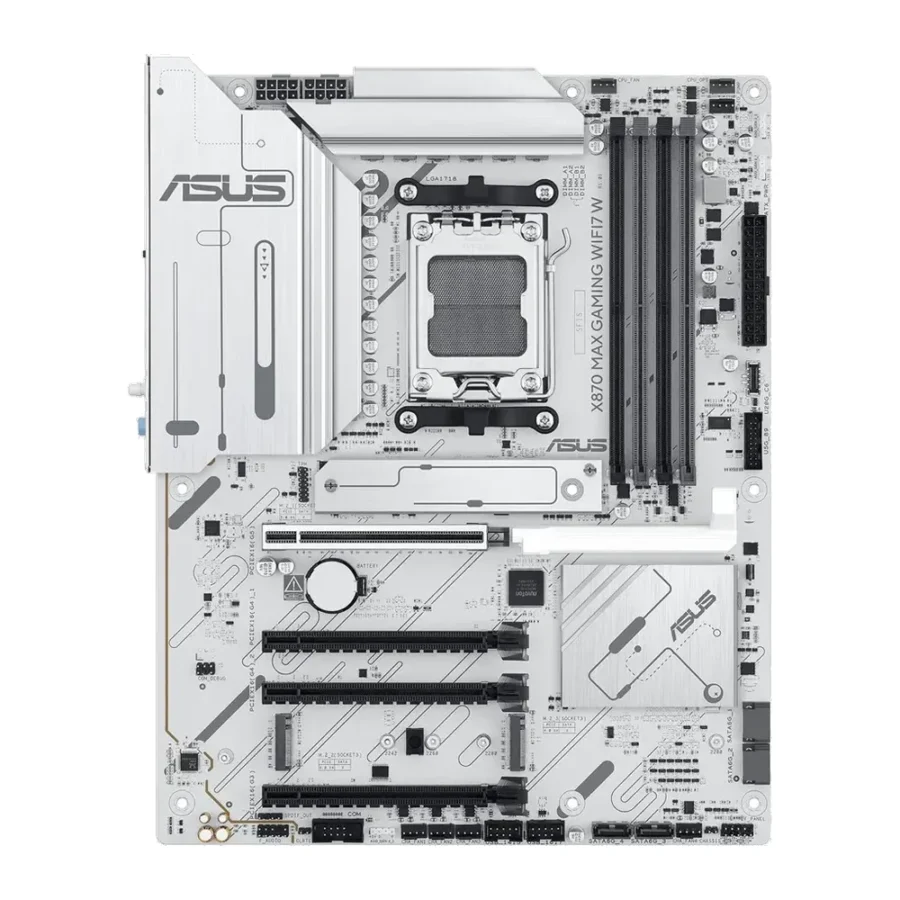
Ask ten builders what they want from a white motherboard and most will say the same two things: it has to look properly white, and it should not feel like a downgrade from the black version. The ASUS X870 MAX Gaming WiFi7 W DDR5 AMD AM5 ATX Motherboard (White) checks both boxes. It uses a white PCB rather than just white covers, and it brings the modern X870 essentials, including PCIe 5.0, USB4 and Wi-Fi 7, to a price bracket that sits below ASUS’s ROG and TUF lines.
For anyone putting together a clean, bright Ryzen system on a sensible budget, this board is worth a close look. Let us go through what it offers and where it fits.
1. Why Choose the ASUS X870 MAX Gaming WiFi7 W?
A Real White Board
The biggest selling point is obvious the moment you see it. The PCB itself is white, so there are no dark gaps between the heatsinks and slots that break the look in a glass-panel case. For fully themed builds, that detail makes a real difference.
X870 Features Without the Premium Branding
ASUS’s MAX Gaming boards focus on the hardware people actually use and skip some of the extra frills of the ROG range. You still get the X870 chipset, which brings USB4 and PCIe 5.0 support as standard, on an AM5 socket that supports current and upcoming Ryzen processors.
2. Design, Power & Build
12+2+1 Power Stages Rated at 80A
The VRM uses a 12+2+1 layout with 80A power stages. In simple terms, that is a solid power design for this class of board, able to feed multi-core Ryzen processors steadily during gaming and long rendering jobs without the board becoming the weak point.
Aura Sync Lighting
Built-in Aura Sync RGB lets you match the board’s lighting with compatible fans, memory and strips. On a white board, even subtle lighting reflects nicely off the PCB and gives the whole interior a soft glow.
3. X870 MAX Gaming WiFi7 W Specs Explained
DDR5 Memory Support
Like every AM5 board, this one runs DDR5 memory only. A 32GB dual-channel kit is the sensible starting point for gaming in 2026, and white or silver heatspreader kits complete the theme nicely.
Three M.2 Slots With PCIe 5.0
You get three M.2 slots, including PCIe 5.0 support for the next generation of NVMe drives. Three slots cover most home builds comfortably: one for Windows and apps, one for your game library, and one spare for recordings or a future upgrade.
PCIe 5.0 x16 With Q-Release
The main graphics slot runs at PCIe 5.0 x16 and uses ASUS’s Q-Release mechanism, which lets you remove the graphics card without reaching under a heavy cooler to press a tiny latch. Anyone who has struggled with a large GPU in a cramped case will appreciate it.
4. Performance in Daily Use
Steady Under Load
A well-built VRM matters more than people think. It keeps the processor at its intended boost behaviour during long gaming sessions instead of letting it slow down when the board heats up. That is where the 80A stages earn their place.
Good for Gaming and Creator Work
Whether you are playing competitive shooters, editing video for a YouTube channel or compiling code, the board gives your processor, memory and graphics card room to run as designed. It will not add performance by itself, but it will not hold anything back either.
5. Wi-Fi 7, USB4 & 2.5Gb LAN
Wireless Without an Adapter
Wi-Fi 7 is onboard, so you can place the PC away from the router without running cables through the house. It works with older routers too, and is ready for faster networks when you upgrade.
USB4 at 40Gbps
The USB4 Type-C port runs at up to 40Gbps. That is ideal for high-speed external SSDs, docks and fast backups, and it is one of the key reasons to choose X870 over older chipsets.
2.5Gb LAN
For gaming, the 2.5Gb LAN port is still the best way to get a steady, low-latency connection, especially in busy households where several devices share the same network.
6. Pakistan Market Perspective
Keeping a White Build Cool
Summers here are tough on any PC, and themed builds sometimes put looks ahead of airflow. Choose a case with a mesh front, add enough intake fans, and the board and processor will stay comfortable even in June.
Protecting Your Investment
Load-shedding and voltage swings are a reality in many cities. Use a good power supply and a UPS sized for your full system so the PC can shut down safely during a power cut. Note that this board comes with a 1-year warranty, so keep the box and invoice safe.
7. ASUS X870 MAX WiFi7 White Price in Pakistan & Value
Where It Sits
This board sits in the mid-range of the X870 market. It costs less than ASUS’s ROG Strix boards but still offers the core features that make X870 worth buying: USB4, Wi-Fi 7 and PCIe 5.0 for both graphics and storage.
Value for Themed Builds
Looking at the ASUS X870 MAX WiFi7 White price in Pakistan, the value is strongest for buyers who want a true white board without paying flagship money. You get the look and the modern platform together.
8. Who Should Buy It?
A Great Fit For
Builders planning a white or light-themed Ryzen PC, gamers who want Wi-Fi 7 and USB4 on a mid-range budget, and anyone who wants an easy GPU release for future upgrades.
Consider Another Board If
You need four M.2 slots, want the longest possible warranty, or do not care about a white build. A standard black X870 or a B850 board may suit you better.
Conclusion
The ASUS X870 MAX Gaming WiFi7 W DDR5 AMD AM5 ATX Motherboard (White) is a well-judged white board for AM5. A 12+2+1 power design with 80A stages, DDR5, three M.2 slots with PCIe 5.0, a Q-Release PCIe 5.0 x16 slot, USB4, Wi-Fi 7, 2.5Gb LAN and Aura Sync all come together on a white PCB.
If your goal is a clean, bright Ryzen gaming PC that still has modern connectivity and a solid upgrade path, this board deserves a place on your shortlist.
FAQs
1. Is the ASUS X870 MAX Gaming WiFi7 W good for gaming?
Yes. Its X870 chipset, 80A power stages, PCIe 5.0 graphics slot and fast storage give a modern Ryzen gaming PC a strong foundation.
2. Which processors does it support?
It uses the AMD AM5 socket and supports Ryzen 7000, 8000 and 9000 series desktop processors.
3. Is the PCB actually white?
Yes. The board uses a white PCB, which makes it a good match for white cases, coolers and memory.
4. Does it support Wi-Fi 7 and USB4?
Yes. It includes Wi-Fi 7, a USB4 40Gbps Type-C port and 2.5Gb LAN.
5. What is the ASUS X870 MAX WiFi7 White price in Pakistan?
Rates change with the market and exchange rate. See the current ASUS X870 MAX WiFi7 White price in Pakistan on this page or contact MHK Tech Zone on WhatsApp for the latest rate.
Reviews
There are no reviews yet.