Description
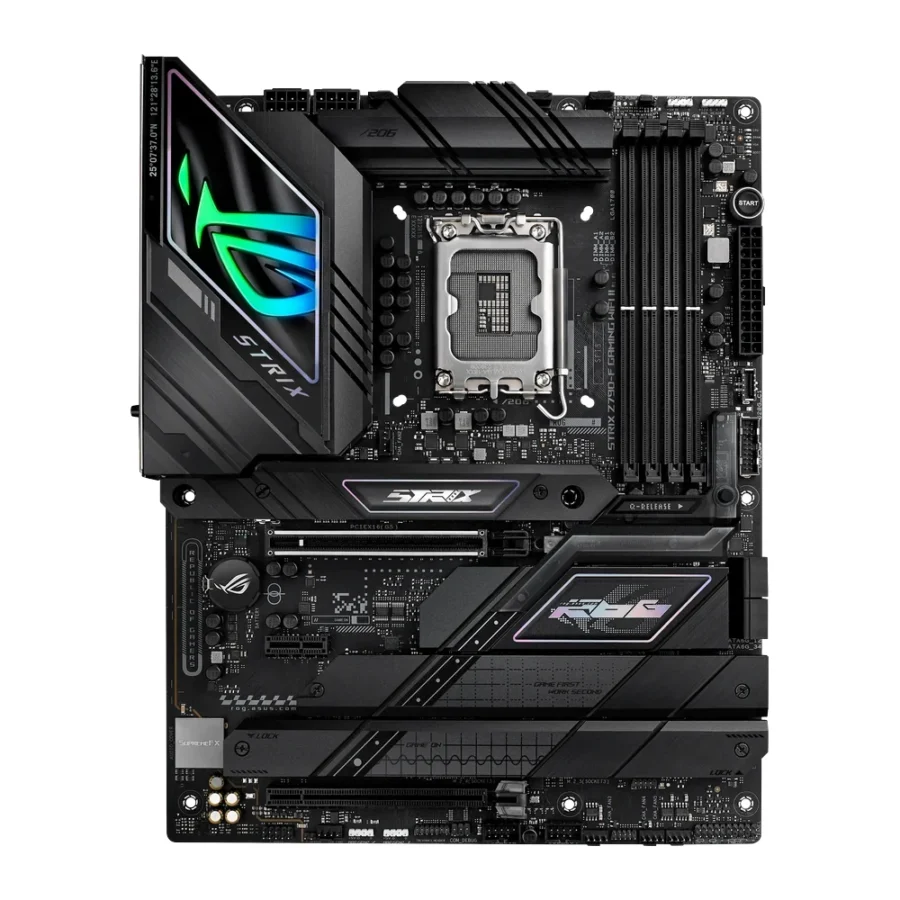
ASUS ROG Strix Z790-F Gaming WiFi II ATX LGA1700 DDR5 Gaming Motherboard :
Buying Guide & Review
Intel’s 13th and 12th Gen chips can pull real power under sustained load, and a lot of budget Z790 boards start to feel stretched once you push a Core i7 or i9 hard for long gaming or streaming sessions. The ASUS ROG Strix Z790-F Gaming WiFi II ATX LGA1700 DDR5 Gaming Motherboard is built for exactly that scenario, pairing a full ATX layout with fast DDR5 memory support and the kind of DIY-friendly touches ASUS is known for on its Strix line.
It keeps the essentials that make a Z790 board worth choosing over a cheaper B760 alternative: serious storage options, current wireless standards and a design built to make building and upgrading easier rather than harder. Here is what stands out.
1. Why the ASUS ROG Strix Z790-F Gaming WiFi II Is a Smart Choice
Built for Intel’s High-End Platform
This board runs on the LGA1700 socket, ASUS’s mainstream slot for 12th, 13th and 14th Gen Intel Core processors. Buying into Z790 rather than a B-series chipset gives you more PCIe lanes, better overclocking support and a board that can comfortably run a Core i7 or i9.
DIY-Friendly by Design
ASUS markets this board around ease of building, with tool-free M.2 heatsinks, a pre-mounted rear I/O shield and clearly labelled headers. Small details like these matter more than they sound, especially the first time you are installing a cooler or swapping a drive.
2. Design & Build
A Full ATX Layout
At 12 x 9.6 inches, this is a proper full-size ATX board, giving ASUS room for a strong VRM design, generous heatsinks and enough spacing around the socket for large air coolers or thick AIO radiators.
The ROG Strix Look
The Strix design language keeps the board mostly black with subtle ROG branding, so it suits both a stealthy build and one with a bit more RGB flair added through your case fans and lighting strips.
3. ASUS ROG Strix Z790-F Gaming WiFi II Specs Explained
DDR5 Memory Up to 192GB
Four DIMM slots support up to 192GB of DDR5 memory, with overclocked speeds rated at 8000MHz and above. That is plenty of room for a gaming rig today and enough headroom for heavier workloads if your needs grow.
Five M.2 Slots and Four SATA Ports
Storage is a real strength here, with five M.2 slots in total alongside four SATA 6Gb/s ports. That is enough for a fast NVMe boot drive, a second drive for games, and still room to carry over older SATA drives from a previous build.
ALC4080 Audio Codec
Onboard audio uses the Realtek ALC4080 codec, a genuine step up from the audio chips found on most mainstream boards, which is a welcome detail if you game with a good headset or run a desktop speaker setup.
4. Gaming Performance
Feeding a High-End CPU Properly
A motherboard’s real job in gaming is staying out of the way, letting the processor and graphics card run at their intended speeds. The power delivery and cooling design here are built to keep a Core i7 or i9 stable through long sessions rather than throttling under pressure.
Fast Storage for Big Game Libraries
With five M.2 slots available, you can spread modern game installs, which keep growing in size, across multiple fast NVMe drives instead of juggling storage on a single crowded SSD.
5. Wi-Fi 7 and DIY Features
Wi-Fi 7 Technology
This board includes Wi-Fi 7 support, ahead of the Wi-Fi 6E found on many current boards. For anyone whose router already supports the newer standard, that translates into a faster and more stable wireless connection with less interference from neighbouring networks.
Small Details That Add Up
Beyond wireless, ASUS’s DIY-friendly design extends to things like clear CMOS buttons and Q-LED debugging lights, which make troubleshooting a new build far less stressful than hunting through a manual.
6. Pakistan Market Perspective
Power Delivery and UPS Sizing
A high-end Intel chip on a full ATX board draws real power under load, so pair it with a quality PSU and a UPS sized for the whole system. That matters most during load-shedding hours, when a switchover under heavy gaming load is the worst time for an undersized UPS to fail.
Keeping It Cool in Summer
Room temperatures climb fast in Pakistani summers, and a demanding Intel CPU on this board benefits from a case with proper intake and exhaust airflow, not just a good cooler sitting inside a stuffy case.
7. ASUS ROG Strix Z790-F Gaming WiFi II Price in Pakistan & Value
Why Choose Z790 Over B760
If you are running a high-end Intel processor, Z790 gives you more PCIe lanes, better overclocking support and generally sturdier power delivery than a B760 board, which matters more as the CPU gets more demanding.
What You Get for the Price
When you check the ASUS ROG Strix Z790-F Gaming WiFi II price in Pakistan, you are paying for five M.2 slots, Wi-Fi 7, upgraded audio and a full ATX layout built to run a serious Intel build for years.
8. Who Should Buy the ASUS ROG Strix Z790-F Gaming WiFi II?
A Great Fit For
Builders running a Core i7 or i9, anyone who wants multiple fast NVMe drives without compromise, and gamers who want the newest Wi-Fi standard built in rather than added later.
Consider Another Board If
You are pairing a lower-end Core i5 with a tighter budget, in which case a solid B760 board will do the job for considerably less money.
Conclusion
The ASUS ROG Strix Z790-F Gaming WiFi II ATX LGA1700 DDR5 Gaming Motherboard is a well-rounded high-end Intel board. It combines DDR5 memory up to 192GB, five M.2 slots, upgraded ALC4080 audio and Wi-Fi 7 on a full ATX layout built with DIY-friendly touches throughout.
For anyone building a serious Intel gaming or creator PC and planning to keep it for years, this board gives the processor room to run at its best without becoming the weak link in the system.
FAQs
1. Is the ASUS ROG Strix Z790-F Gaming WiFi II good for gaming?
Yes. Its strong power delivery, fast DDR5 memory support and multiple NVMe slots make it a solid base for a high-end Intel gaming build.
2. Which processors does it support?
It uses the LGA1700 socket and supports Intel 12th, 13th and 14th Gen Core desktop processors on the Z790 chipset.
3. How much storage can I install?
There are five M.2 slots in total plus four SATA 6Gb/s ports, giving you room for multiple fast NVMe drives alongside SATA storage.
4. Does it support Wi-Fi 7?
Yes. It includes Wi-Fi 7 technology, which is ahead of the Wi-Fi 6E found on many other current boards.
5. What is the ASUS ROG Strix Z790-F Gaming WiFi II price in Pakistan?
Prices shift with stock and the exchange rate. Check the current ASUS ROG Strix Z790-F Gaming WiFi II price in Pakistan on this page or message MHK Tech Zone on WhatsApp.


Reviews
There are no reviews yet.