Description
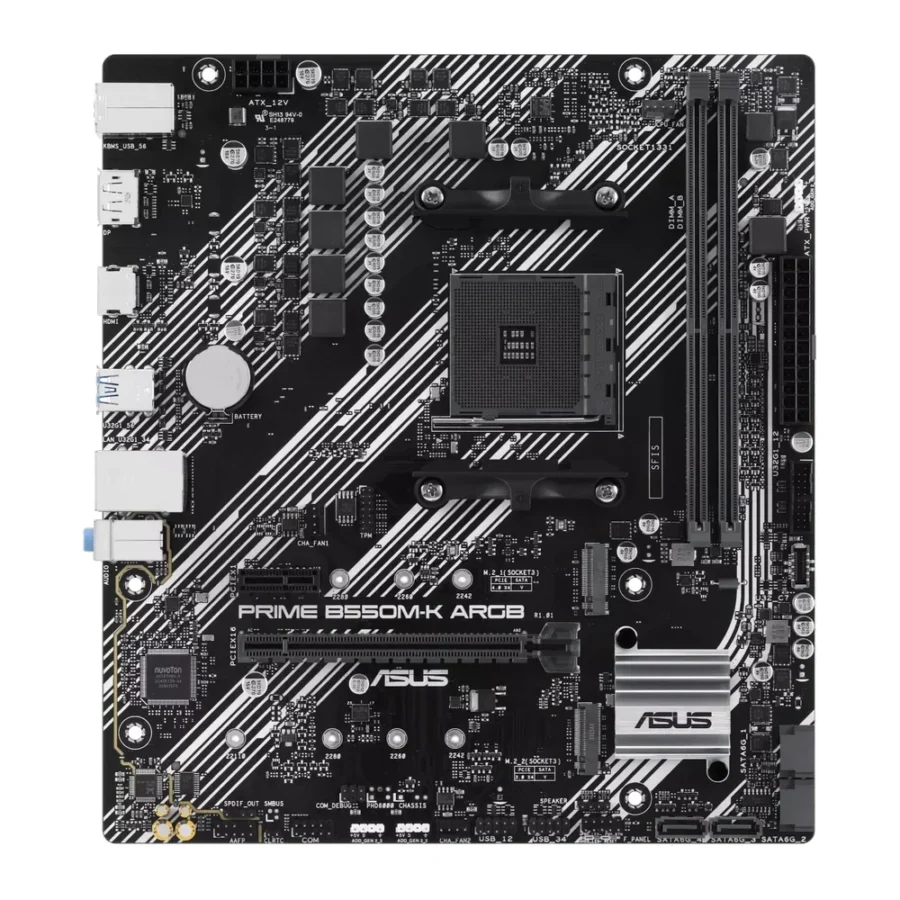
ASUS Prime B550M-K ARGB DDR4 AMD AM4 microATX Motherboard :
Buying Guide & Review
AM4 is one of the longest-lived desktop platforms ever, and there are still good reasons to build on it. Ryzen 5000 processors remain strong for gaming and work, DDR4 memory is cheap and widely available, and many people already own parts that fit. The ASUS Prime B550M-K ARGB DDR4 AMD AM4 microATX Motherboard takes that mature platform and adds PCIe 4.0, dual M.2 storage and addressable RGB headers.
If you are upgrading an older Ryzen system or building a budget gaming PC where every rupee counts, this board deserves a closer look. Here is what it offers and where it fits.
1. Why the ASUS Prime B550M-K ARGB Still Makes Sense
A Proven Platform at a Lower Cost
Building on AM4 lets you use DDR4 memory and a wide choice of Ryzen processors, many of which are now very affordable. For a budget gaming or office build, that often delivers more performance per rupee than starting fresh on a newer platform.
An Easy Upgrade for Older Ryzen Owners
If you have an older AM4 board and want features like PCIe 4.0 or a second M.2 slot, moving to B550 lets you keep your processor and memory. It is a practical way to refresh a system without replacing everything.
2. Design & Lighting
Aura Sync ARGB Headers
The ARGB in the name refers to the addressable RGB headers, controlled through ASUS Aura Sync. You can connect ARGB fans or strips and set up effects that match the rest of your build, all managed from one place.
Compact Micro-ATX Size
The Micro-ATX form factor fits the compact and mid-tower cases most people buy for home use. It keeps the build small while still leaving space for a full-size graphics card.
3. ASUS Prime B550M-K ARGB Specs Explained
The B550 Chipset
B550 is AMD’s mainstream AM4 chipset and the one that brought PCIe 4.0 to affordable boards. With a supported Ryzen processor, the graphics card slot and primary M.2 slot can run at PCIe 4.0 speeds.
Dual M.2 and SATA 6Gbps
Two M.2 slots let you install a fast NVMe SSD for Windows and a second drive for games or projects. SATA 6Gbps ports handle older SSDs and hard drives for backups and media storage.
DisplayPort and HDMI
With a Ryzen APU that has integrated graphics, the DisplayPort and HDMI outputs let you drive a monitor without a separate graphics card, useful for office builds or while you save for a GPU.
4. Gaming Performance
A Strong Budget Gaming Base
Paired with a Ryzen 5 or Ryzen 7 from the 5000 series and a capable graphics card, this board forms a well-balanced gaming PC. The board’s job is to keep the processor, memory and graphics card running properly, and B550 handles that without trouble.
PCIe 4.0 Where It Counts
PCIe 4.0 support means newer graphics cards and Gen4 NVMe drives have the bandwidth they are designed for, giving the build more headroom than older chipsets offer.
5. Connectivity
Realtek 1Gb Ethernet
A standard Gigabit Ethernet port handles home broadband and online gaming comfortably. There is no built-in Wi-Fi, so plan for a network cable or an add-in wireless adapter.
USB 3.2 Gen 1 and Front Type-C
USB 3.2 Gen 1 ports cover fast external drives and peripherals, and a front USB 3.2 Gen 1 Type-C header lets compatible cases offer a Type-C port on the front panel for phones and modern flash drives.
6. Pakistan Market Perspective
Value When Budgets Are Tight
With prices rising across the board, AM4 remains one of the most economical routes to a capable PC in Pakistan. DDR4 kits and Ryzen 5000 processors are widely available, which keeps the overall build cost down.
Heat and Power Planning
Keep the system in a case with good airflow and connect it to a UPS, especially during summer and load-shedding. That protects your components and your work from sudden power cuts.
7. ASUS Prime B550M-K ARGB Price in Pakistan & Value
Where It Sits
This board sits in the budget-to-mainstream B550 range. It adds ARGB lighting, dual M.2 slots and a front Type-C header over the most basic boards, without climbing into premium territory.
Checking Availability
When you check the ASUS B550M-K ARGB price in Pakistan, keep in mind that stock of AM4 boards can vary. Confirm availability before planning your build around it.
8. Who Should Buy the ASUS Prime B550M-K ARGB?
A Great Fit For
Budget gamers building on Ryzen 5000, owners of older AM4 systems looking to upgrade, RGB fans who want ARGB control on a compact board, and anyone who wants two M.2 slots without paying for a newer platform.
Consider Another Board If
You want DDR5 and an upgrade path to future Ryzen processors, need built-in Wi-Fi, or want faster than Gigabit networking. An AM5 board will be the better long-term choice in that case.
Conclusion
The ASUS Prime B550M-K ARGB DDR4 AMD AM4 microATX Motherboard gets the most out of a mature, affordable platform. AMD’s B550 chipset, PCIe 4.0 support, dual M.2 slots, DisplayPort and HDMI outputs, USB 3.2 Gen 1 with a front Type-C header and Aura Sync ARGB lighting make it a well-equipped choice for budget builds.
If you want a capable Ryzen gaming or work PC without the higher cost of a newer platform, this board is a smart way to do it.
FAQs
1. Which processors work with the ASUS Prime B550M-K ARGB?
It uses the AMD AM4 socket and works with supported Ryzen desktop processors, including the popular Ryzen 5000 series. Check the ASUS CPU support list for your exact chip.
2. Does it support PCIe 4.0?
Yes. With a supported Ryzen processor, the B550 chipset enables PCIe 4.0 on the graphics card slot and primary M.2 slot.
3. Can I control RGB lighting?
Yes. It has addressable RGB headers controlled through ASUS Aura Sync.
4. Does it have Wi-Fi?
No. It uses Realtek 1Gb Ethernet for networking. You can add a Wi-Fi adapter if you need wireless.
5. What is the ASUS B550M-K ARGB price in Pakistan?
Prices and stock can change quickly. Check the current ASUS B550M-K ARGB price in Pakistan on this page or message MHK Tech Zone on WhatsApp for the latest rate and availability.


Reviews
There are no reviews yet.