Description
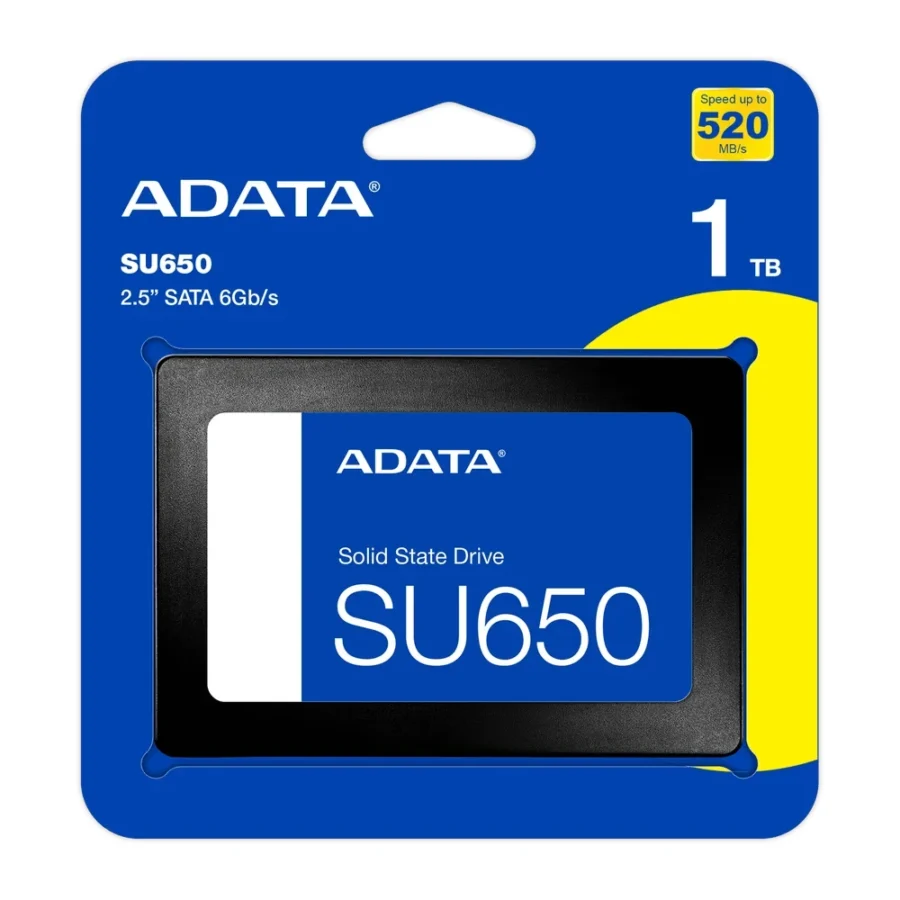
ADATA Ultimate SU650 1TB 2.5-inch SATA III 3D NAND SSD :
Buying Guide & Review
There are still millions of perfectly usable computers that feel painfully slow for one reason: a spinning hard drive. The ADATA Ultimate SU650 1TB 2.5-inch SATA III 3D NAND SSD is one of the simplest and most affordable fixes, turning a sluggish laptop or desktop into something that boots quickly and opens programs without the endless wait.
With a full terabyte of space, it is also big enough to replace a hard drive entirely rather than just act as a small boot drive. Here is what the SU650 brings and who it suits best.
1. Why the ADATA SU650 Is a Smart Upgrade
The Biggest Jump for the Smallest Budget
Replacing a hard drive with an SSD is the upgrade that changes how a computer feels more than any other. The SU650 is rated at up to 520MB/s read and 450MB/s write, several times faster than a typical 5400 or 7200rpm drive, and far quicker in the random access that everyday computing depends on.
A Full Terabyte of Room
Many budget SSDs come in small capacities that force you to juggle files. At 1TB, the SU650 can hold Windows, your applications and a large collection of documents, photos and even a few games on one drive.
2. Design and Build
Standard 2.5-inch Size
The drive uses the familiar 2.5-inch form factor, the same size as laptop hard drives. It drops into laptop drive bays, desktop 2.5-inch mounts, and small form factor office PCs without any fuss.
No Moving Parts
Unlike a hard drive, there is no spinning platter or moving head inside. That makes the SU650 resistant to shocks and vibration, silent in operation, and far less likely to be damaged if a laptop gets knocked off a table.
3. ADATA SU650 Specs Explained
SATA III Interface
SATA III is supported by virtually every desktop and laptop made in the last decade. That makes the SU650 one of the safest upgrades you can buy, since there is almost no chance your system will not recognise it.
3D NAND Flash
ADATA uses 3D NAND, which stacks memory cells vertically. This design improves efficiency and reliability compared with older flat NAND, helping the drive offer good capacity at a reasonable cost.
4. Everyday Performance
Faster Boots and App Launches
Windows starts in a fraction of the time, programs open quickly, and file searches finish sooner. Office software, browsers and accounting tools all feel more responsive.
Keeping Expectations Realistic
SATA SSDs cannot match NVMe drives for raw sequential speed. For boot drives, office tasks and general use, though, the difference is far smaller than the huge jump from a hard drive to the SU650.
5. Compatibility and Installation
Laptops and Desktops
Most laptops with a 2.5-inch bay can take the SU650 directly. On desktops you need a SATA data cable, a SATA power connector and either a 2.5-inch mount or a simple bracket for a 3.5-inch bay.
Moving Your Existing System
You can clone your current hard drive to the SU650 using migration software and a USB-to-SATA adapter or dock, or do a fresh Windows installation for the cleanest result. Keep the old hard drive as a secondary backup drive afterwards.
One small tip for desktop users: many cheaper cases include only 3.5-inch bays, but a 2.5-inch SSD weighs so little that a simple adapter bracket, or even a secure spot away from the fans, works fine. Just make sure the SATA cable is plugged into a port on the motherboard that is enabled in the BIOS.
6. Pakistan Buyer Perspective
Reviving Office and Home PCs
Across Pakistan, offices, schools and families still depend on older machines with hard drives. A 1TB SATA SSD is a low-cost way to extend their useful life by years instead of buying a new PC.
Heat, Power and Reliability
SSDs run cooler than hard drives, which helps in summer, and they handle vibration better in busy environments. Still, sudden power cuts are risky for any storage, so keep critical PCs on a UPS. A 2-year local warranty with replacement or refund also adds reassurance.
7. ADATA SU650 1TB Price in Pakistan and Value
Strong Value per Gigabyte
1TB SATA SSDs have become very reasonably priced, and the SU650 sits in the budget-friendly part of that market. It is a great way to get plenty of fast storage without stretching the budget.
SATA or NVMe?
When checking the ADATA SU650 1TB price in Pakistan, compare it with entry NVMe drives only if your system has an M.2 slot. For older laptops and desktops without NVMe support, a SATA SSD like this is the right choice.
8. Who Should Buy the ADATA SU650 1TB?
Great For
Owners of older laptops and desktops, offices upgrading many PCs, students on a budget, and gamers who want a second drive for extra games.
Choose Something Else If
Your system has an NVMe M.2 slot and you want the highest speeds, or you need a drive designed for heavy, continuous professional writes.
Conclusion
The ADATA Ultimate SU650 1TB 2.5-inch SATA III 3D NAND SSD is an easy way to breathe new life into an old computer. Up to 520MB/s reads and 450MB/s writes, 3D NAND, a shock-resistant design and a full terabyte of space make it a practical everyday drive.
If your PC still runs on a hard drive, the SU650 is one of the most sensible and affordable upgrades you can make.
FAQs
1. Is the ADATA SU650 good for old laptops?
Yes. It fits standard 2.5-inch bays and makes older laptops boot and run much faster than with a hard drive.
2. How fast is it?
It is rated at up to 520MB/s read and 450MB/s write.
3. Can I use it as a second drive in a desktop?
Yes. Connect it with a SATA data cable and SATA power, and use it for games, files or backups.
4. Does it need special drivers?
No. SATA SSDs are supported natively by Windows and other modern operating systems.
5. What is the ADATA SU650 1TB price in Pakistan?
Prices vary with the market. Check the current ADATA SU650 1TB price in Pakistan on this page or message MHK Tech Zone on WhatsApp for the latest rate.


Reviews
There are no reviews yet.