Description
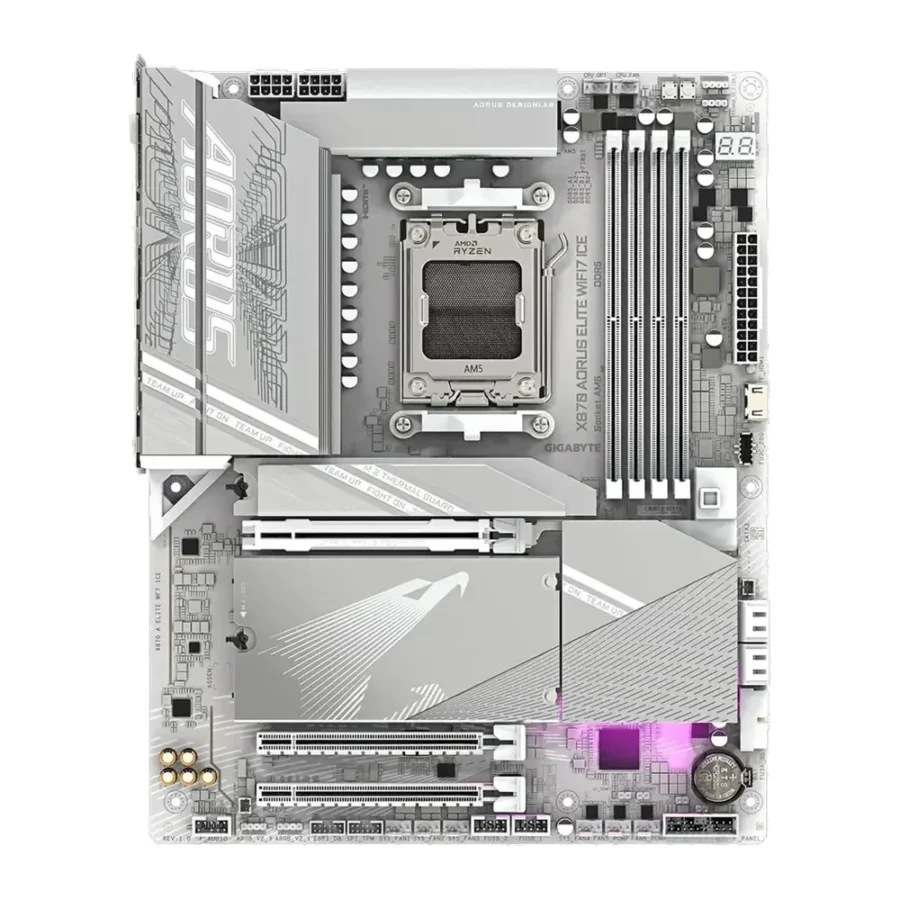
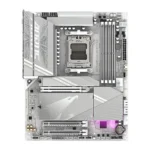
Gigabyte X870 AORUS Elite WiFi7 ICE DDR5 AMD AM5 ATX Motherboard :
Buying Guide & Review
White builds have gone from a niche look to one of the most requested styles in PC shops across Pakistan, but finding a white motherboard that is more than just a paint job has always been the hard part. The Gigabyte X870 AORUS Elite WiFi7 ICE DDR5 AMD AM5 ATX Motherboard solves that problem. Under the frosty finish sits a full X870 platform with PCIe 5.0 graphics, three PCIe 5.0 NVMe slots, Wi-Fi 7 and dual USB4, so the board looks clean without cutting corners where it counts.
If you are planning a snow-white Ryzen build with a matching case, cooler and memory, this is one of the few boards that ties it all together. Here is what it offers and who it suits.
1. Why the Gigabyte X870 AORUS Elite WiFi7 ICE Stands Out
An Upper Mid-Range Board With a White Finish
The AORUS Elite line is Gigabyte’s upper mid-range gaming series. It sits above the Eagle boards and below the Pro and Master models, which means you get the important X870 features without the cost of flagship extras. The ICE edition takes that same hardware and dresses it in white, with light-coloured heatsinks and shrouds designed for bright, themed builds.
Built for Three Ryzen Generations
Because it uses AMD’s AM5 socket, the board runs Ryzen 7000, Ryzen 8000 and Ryzen 9000 desktop processors. The processor you start with does not have to be the one you finish with.
2. Design & Build Quality
The ICE Look Up Close
Most white boards on the market only change a few covers. The ICE styling here is meant to carry the whole theme, which matters when you are using a glass-panel case and the motherboard is the biggest visible surface in the build.
Full ATX Layout
The standard ATX size gives the board room for four memory slots, four M.2 slots and properly spaced heatsinks. Before you buy, confirm that your case supports ATX boards; most mid towers sold locally do, but some compact white cases are microATX only.
3. Gigabyte X870 AORUS Elite WiFi7 ICE Specs Explained
Four DDR5 Slots With AMD EXPO
Dual-channel DDR5 runs across four DIMM slots, and AMD EXPO support lets you load a rated memory profile from the BIOS with a single setting. Most gamers will be happy with a 2 x 16GB kit today, while the extra two slots give you a simple route to more capacity if you move into editing, 3D work or heavy multitasking.
Four M.2 Slots, Three at PCIe 5.0
Storage is where this board really pulls ahead of cheaper options. There are four M.2 slots, and three of them run at PCIe 5.0 x4. You may not own a Gen 5 drive yet, but those slots work perfectly with the PCIe 4.0 NVMe drives most people buy today and leave space for faster drives later.
PCIe 5.0 x16 for the Graphics Card
The main expansion slot is PCIe 5.0 x16. Current graphics cards run happily on it, with headroom left for future GPUs.
4. Gaming & Everyday Performance
A Stable Foundation
A motherboard does not create frames on its own. Its real job is to deliver clean power to the processor and keep memory, storage and graphics running at their proper speeds. An Elite-class X870 board is designed to handle strong Ryzen chips without breaking a sweat, which keeps gameplay smooth during long sessions.
Fast Loading and Quick Transfers
With multiple NVMe slots you can split Windows, your game library and your recording drive across separate SSDs. That keeps load screens short and large file transfers quick.
5. Wi-Fi 7, 2.5GbE & USB4 Connectivity
Wi-Fi 7 Ready
Wi-Fi 7 is built in, so you do not need a separate adapter. It works with older routers too, and is ready for a faster network when you upgrade.
Wired 2.5GbE for Serious Play
For ranked matches, a cable is still the best option. The 2.5GbE port gives you a stable wired link that is less affected by other devices in the house streaming or downloading at the same time.
Dual USB4 Type-C and HDMI
Two USB4 Type-C ports on the rear panel are ideal for fast external SSDs and modern docks. HDMI output is also included, handy for Ryzen chips with integrated graphics if you need to run the PC before your graphics card arrives.
6. Pakistan Market Perspective
Planning for Heat and Power Cuts
Summer temperatures and load-shedding are part of every build conversation here. A board of this class works best with a quality power supply, a correctly sized UPS and a case with good front-to-back airflow. Mesh-front white cases help a lot in hot months.
A Longer Warranty
This board comes with a 2-year warranty, which is longer than many boards in the same bracket. For an investment in the upper mid-range, that extra year gives useful peace of mind.
7. X870 AORUS Elite WiFi7 ICE Price in Pakistan & Value
Paying for the Look, and More
White motherboards usually cost a little more than their black versions. Here the premium buys a complete theme on top of a platform that already includes Wi-Fi 7, USB4 and generous PCIe 5.0 storage, so you are not paying extra just for colour.
Is It Worth It?
When you compare the AORUS X870 Elite WiFi7 ICE price in Pakistan with what it offers, the value is clearest for builders who want a white system and plan to keep it for several years. The four M.2 slots and PCIe 5.0 support mean the board is unlikely to become the bottleneck anytime soon.
8. Who Should Buy This Board?
A Great Fit For
Gamers and creators building a white-themed Ryzen PC, anyone who needs multiple fast NVMe drives, and users who want Wi-Fi 7 and USB4 on a board that will support future Ryzen upgrades.
Consider Another Board If
You are building an all-black system and do not care about aesthetics, or you only need one SSD and basic networking. In that case a standard X870 or B850 board would be a cheaper route.
Conclusion
The Gigabyte X870 AORUS Elite WiFi7 ICE DDR5 AMD AM5 ATX Motherboard brings together a clean white design and a serious feature set. Four DDR5 slots with EXPO, four M.2 slots with three running at PCIe 5.0, a PCIe 5.0 x16 graphics slot, Wi-Fi 7, 2.5GbE and dual USB4 give it everything a modern Ryzen build needs.
Add the 2-year warranty and support for Ryzen 7000 through 9000, and it becomes a board you can build around with confidence. For white-themed gaming PCs, it is one of the strongest choices available.
FAQs
1. Which processors does the X870 AORUS Elite WiFi7 ICE support?
It uses the AM5 socket and supports AMD Ryzen 9000, 8000 and 7000 series desktop processors.
2. How many M.2 slots does it have?
There are four M.2 slots in total, and three of them support PCIe 5.0 x4 NVMe drives.
3. Does it have built-in Wi-Fi?
Yes. Wi-Fi 7 is onboard, along with a 2.5GbE LAN port for wired connections.
4. What is the difference between ICE and the standard version?
The ICE edition uses a white design for themed builds. It is aimed at buyers who want the motherboard to match white cases, coolers and memory.
5. What is the AORUS X870 Elite WiFi7 ICE price in Pakistan?
Prices move with stock levels and the exchange rate. Check the current AORUS X870 Elite WiFi7 ICE price in Pakistan on this page or message MHK Tech Zone on WhatsApp for the latest rate.

Reviews
There are no reviews yet.