Description
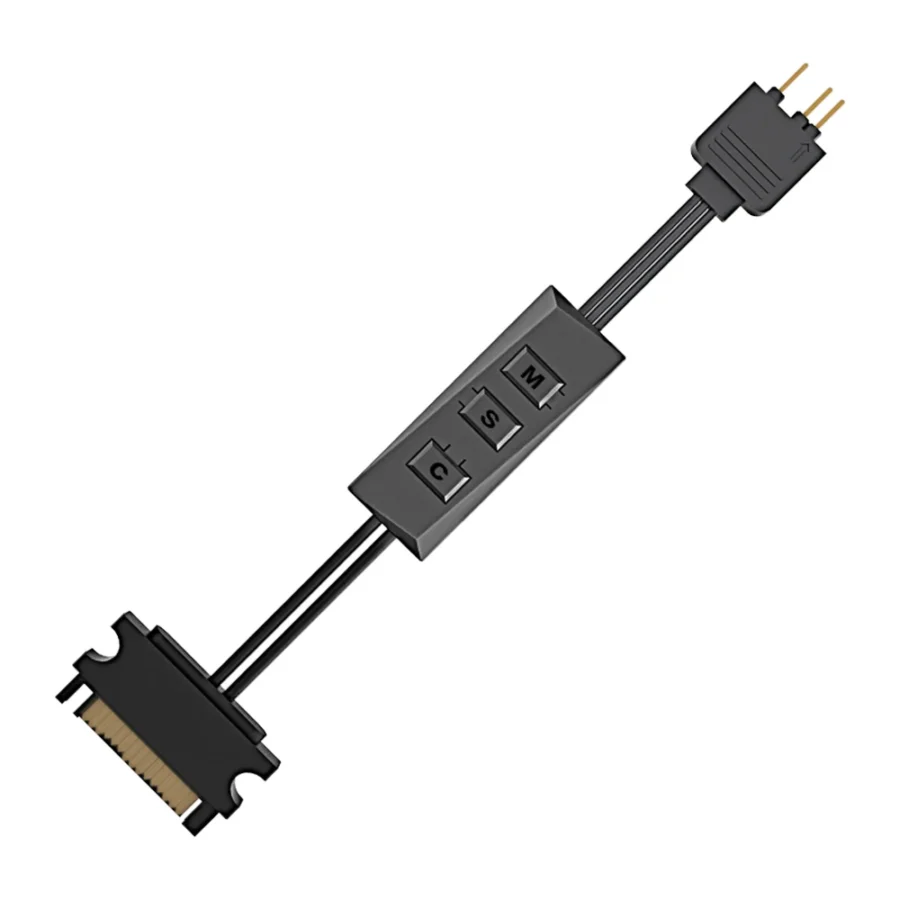
ID-Cooling RC-ARGB 5V 3-Pin ARGB Lighting Controller :
Buying Guide & Review
Plenty of builders buy ARGB fans and then discover the awkward part: the motherboard has one ARGB header, or none at all, and the fans sit dark or stuck on a single default pattern. A small controller fixes that problem for very little money.
The ID-Cooling RC-ARGB 5V 3-Pin ARGB Lighting Controller is that sort of fix. It works on the standard 5V addressable lighting system, uses the common 3-pin connector and can run more than one device, so it pulls a mixed set of fans and strips together under one control point. Here is how it works and whether your build needs one.
1. Why the ID-Cooling RC-ARGB Is Worth Having
Lighting Without Motherboard Support
Older boards and many entry-level models ship without a 5V ARGB header. The RC-ARGB gives those systems a way to run addressable lighting properly, so you are not forced to change the motherboard just to light your fans.
One Point of Control
Instead of each fan or strip doing its own thing, everything connected to the controller follows the same effect, which makes the build look deliberate rather than random.
2. Design & Build
Small Enough to Hide
The controller is compact, so it tucks behind the motherboard tray or into the cable area next to the power supply. Once the side panel is closed, all that shows is the lighting itself.
A Brand Known for Cooling
ID-Cooling builds air coolers, liquid coolers and fans, so this controller is designed around the same 5V ARGB standard that its own fans and many other brands use.
3. ID-Cooling RC-ARGB Specs Explained
5V, Not 12V
The controller works with 5V addressable RGB. That matters, because 5V ARGB and older 12V RGB use different signals and pinouts. Connecting a 12V RGB device to a 5V ARGB controller, or the reverse, can damage LEDs, so check the label on your fans before plugging anything in.
The 3-Pin Connector
5V ARGB devices use a 3-pin plug with one blanked position. It is the same connector type found on most ARGB fans, strips and motherboard headers, so compatibility is broad.
Multiple Devices
The controller is designed to feed more than one ARGB device. For larger setups, spread devices sensibly and avoid chaining too many LEDs on one line, which keeps colours even from the first fan to the last.
4. Performance in Real Builds
Stable Power to the LEDs
A controller’s real job is steady power and a clean signal. When either is weak, you get flickering, colours that drift or LEDs that freeze. A properly built controller keeps effects smooth and consistent.
Setting It Up
Plan the cable route before you fit the controller. Connect the fans and strips first, route the leads neatly and then power the controller. Test the lighting with the side panel off so you can spot a loose plug straight away.
5. Compatibility & Use Cases
Mixed-Brand Lighting
Because 5V 3-pin ARGB is an industry standard, the controller can bring fans from one brand and an LED strip from another under the same effect, as long as every device is 5V ARGB.
Case Kits and Upgrades
It is useful when you add ARGB fans to a case that already has a few, or when a fan kit arrived without its own controller. It is also handy for desk and shelf strips around a gaming setup.
6. Pakistan Market Perspective
Rescuing an Older Build
Many PCs in Pakistan run on motherboards bought several years ago, and a full platform change is costly. A small controller lets you refresh the look of that system with new ARGB fans without paying for a new board.
Power Cuts and Surges
Load-shedding switchovers and voltage spikes can hit small electronics hard. Keep the PC on a decent UPS or stabiliser, and if the lighting starts behaving strangely after a power event, reseat the connectors before assuming a fault.
Easy to Find, Easy to Replace
Controllers like this are small and affordable, so they are an easy item to keep a spare of, or to pick up alongside a fan kit when you plan your next upgrade.
7. ID-Cooling RC-ARGB Price in Pakistan & Value
Cheap Compared With the Alternative
The other way to gain ARGB control is a motherboard upgrade. Against that cost, a controller is a very small spend for the same visible result.
Warranty Note
The controller comes with a 7-day replacement or refund window. Connect and test it with all your devices soon after purchase so any issue is caught early.
8. Who Should Buy the ID-Cooling RC-ARGB?
A Great Fit For
Owners of motherboards without a 5V ARGB header, builders mixing ARGB fans and strips from different brands, and anyone whose fan kit came without a controller.
Skip It If
Your motherboard already has enough 5V ARGB headers and you are happy with its software, or your fans use the older 12V 4-pin RGB standard, which this controller does not target.
Conclusion
The ID-Cooling RC-ARGB 5V 3-Pin ARGB Lighting Controller is a small part that solves a real problem. It gives addressable lighting a proper home on systems that lack the right header, and it brings several devices together under one clean effect.
Confirm that your devices are 5V 3-pin ARGB, plan the cable route and keep the PC on a UPS. After that, the controller simply works and stays out of sight.
FAQs
1. Does this work with 12V RGB fans?
No. It is a 5V 3-pin ARGB controller. 12V 4-pin RGB devices use a different standard and should not be connected to it.
2. Can I connect more than one fan?
Yes, it is designed to support multiple ARGB devices. Keep the total number reasonable so the lighting stays even.
3. Do I need a motherboard ARGB header?
No. The controller is most useful precisely when your board has no spare 5V ARGB header.
4. Will it work with other brands’ fans?
Generally yes, as long as the fans or strips use the standard 5V 3-pin ARGB connector.
5. What is the ID-Cooling RC-ARGB price in Pakistan?
Accessory prices move with stock and exchange rates. See the current ID-Cooling RC-ARGB price in Pakistan on this page or contact MHK Tech Zone on WhatsApp for the latest rate.

Reviews
There are no reviews yet.