Description
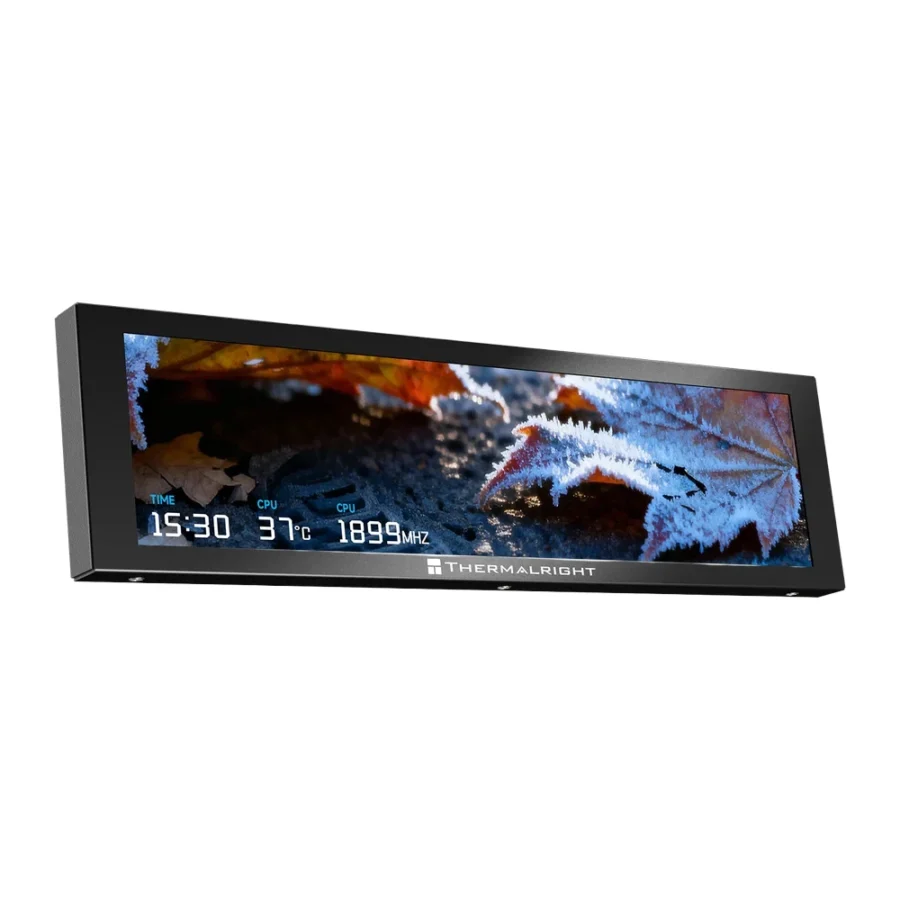
Thermalright Trofeo Vision 9.16-Inch 1920×480 USB Type-C LCD Screen (Black/White) :
Buying Guide & Review
Your PC already knows how hot it is running, how hard the graphics card is working and how much memory is in use. The Thermalright Trofeo Vision 9.16-Inch 1920×480 USB Type-C LCD Screen simply puts that information where you can see it. This slim ultrawide panel adds a live dashboard or custom display to your build, turning the inside of your case into something you actually want to look at.
In-case screens have become one of the most popular upgrades for enthusiasts, and Thermalright’s take keeps things compact and simple to connect. Here is what the Trofeo Vision 9.16 offers and who will get the most out of it.
1. What the Trofeo Vision 9.16 Does
A Second Screen for Your PC’s Vital Signs
Rather than opening monitoring software on your main display, the Trofeo Vision shows temperatures, loads and other readings on a dedicated panel. You can glance at it mid-game without alt-tabbing or covering part of the screen with an overlay.
More Than Numbers
The panel can also show images and animations, so it can become part of your build’s theme. Some users keep it purely functional, while others use it to display artwork or a clock.
2. Display & Size
9.16-Inch Ultrawide Panel
The 9.16-inch screen uses a wide, narrow shape that fits naturally along the edge of a case or beneath a graphics card. That format suits stat bars and graphs, which read well across a long panel.
1920×480 Resolution
At 1920×480, text and graphics look sharp across the full width. Temperature readouts, graphs and small labels remain easy to read even from a short distance.
Black or White
The Trofeo Vision 9.16 comes in black and white versions. Choose the one that matches your case frame so the screen looks like it belongs there rather than being added later.
3. Compact Build & Mounting
Slim Dimensions
The unit measures 251 x 68 x 17mm. At only 17mm thick, it can fit into spaces where a bulkier panel would struggle, which gives you more choice in where to place it.
Choosing a Location
Before buying, plan where the screen will sit. Check that it will not interfere with airflow paths, fans or cables, and that it will be visible through your case’s glass panel from your normal seating position.
4. Connection & Setup
USB Type-C Connection
The screen connects via USB Type-C. A single cable keeps the installation neat and simple, and routing it inside the case is straightforward compared with running video cables.
Software Control
Thermalright provides software to choose what appears on the screen. Spend a little time setting up a layout you like, and it will run in the background every time you use your PC.
Compatibility Check
Confirm how the USB Type-C cable connects to your system, whether through an internal header adapter or an external port, and that you have a free connection available. Checking this ahead of time avoids surprises on build day.
5. Everyday Benefits
Spot Problems Early
A screen that constantly shows temperatures is a practical early-warning system. If a fan fails or dust builds up, you will notice the numbers climbing before you notice performance dropping.
A Talking Point
An in-case screen makes a build instantly memorable. For streamers and content creators, it also looks great on camera.
Ideas for Your Layout
A good starting layout shows CPU temperature, GPU temperature and usage side by side, with a small clock in the corner. If you edit videos or render, add memory usage so you can see when a project is pushing your system. Keep the design simple and high-contrast so it stays readable through tinted glass, and save a second, more decorative layout for when you just want the build to look good.
6. The Local Angle
Useful in the Summer Months
With high temperatures for much of the year, keeping an eye on your system’s heat is genuinely useful. The Trofeo Vision gives you that information at a glance, helping you decide when to clean filters or adjust fan curves.
Plan Your Budget
For budget builds, the essentials should come first: a good CPU cooler, a reliable power supply and a UPS for load-shedding. Once those are covered, a screen like this is a satisfying finishing touch.
7. Thermalright Trofeo 9.16 Price in Pakistan & Value
A Premium Accessory
The Thermalright Trofeo 9.16 price in Pakistan reflects its status as an enthusiast accessory. It does not make your PC faster, but it makes it more informative and more personal.
Compared to a Screen Case
Buying a standalone screen can cost less than replacing a whole case to get a built-in display, and it lets you keep the case you already like.
8. Who Should Buy the Trofeo Vision 9.16?
Great For
Enthusiasts who like to monitor their hardware, builders creating a showpiece PC, streamers and creators, and anyone who wants to personalise their setup.
Maybe Skip If
Every rupee in your budget needs to go towards performance, or your case has no space to mount an extra panel.
Conclusion
The Thermalright Trofeo Vision 9.16-Inch 1920×480 USB Type-C LCD Screen is a clean, compact way to add a live display to your PC. A sharp 1920×480 ultrawide panel, simple USB Type-C connection and a slim 17mm body make it easy to fit and easy to enjoy.
It is an upgrade driven by style and convenience rather than speed, but for builders who love their setup, it adds a lot of personality.
FAQs
1. What is the screen size of the Trofeo Vision 9.16?
It has a 9.16-inch ultrawide display.
2. What resolution does it run at?
The panel resolution is 1920×480.
3. How does it connect?
It connects using a USB Type-C connection.
4. How big is it?
The screen measures 251 x 68 x 17mm.
5. What is the Thermalright Trofeo 9.16 price in Pakistan?
Prices change with the market. Check the current Thermalright Trofeo 9.16 price in Pakistan on this page or message MHK Tech Zone on WhatsApp for the latest rate.


Reviews
There are no reviews yet.