Description
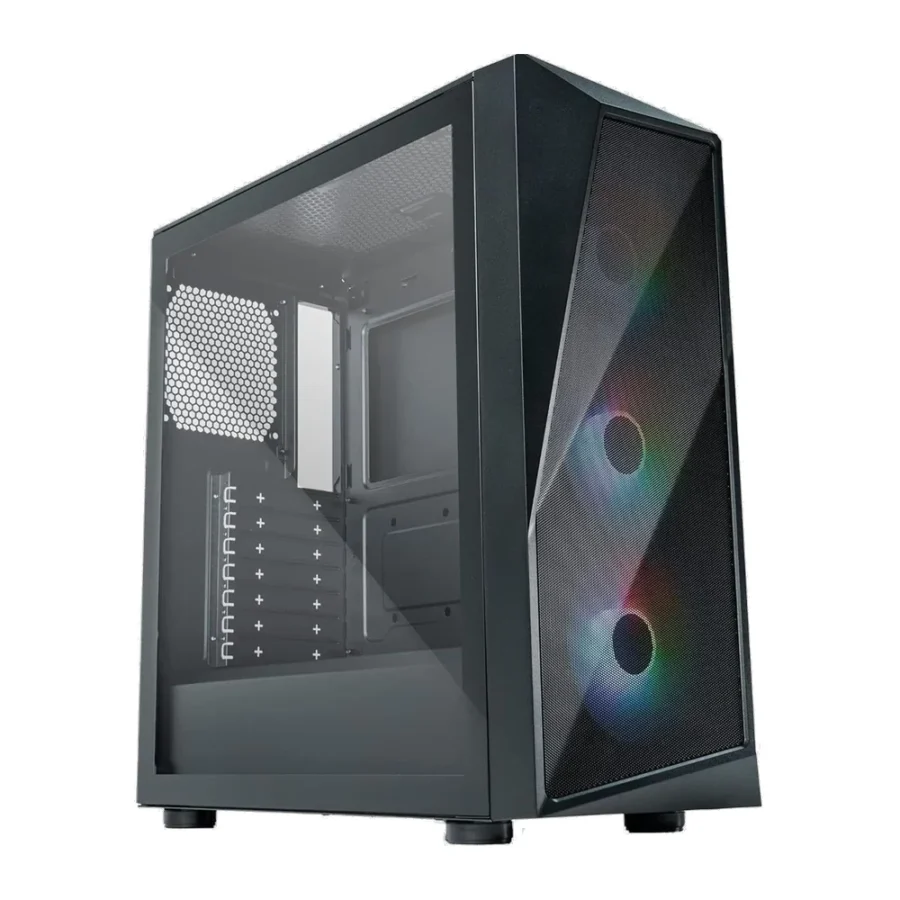
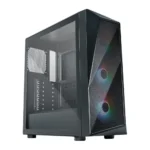
Cooler Master CMP 520 ARGB ATX Mid-Tower Gaming Case Black :
Buying Guide & Review
Cooler Master has been making PC cases for a very long time, and the CMP series is where it puts that experience into affordable, no-fuss designs. The Cooler Master CMP 520 ARGB ATX Mid-Tower Gaming Case Black is a good example. It pairs a striking geode-style front with a mesh panel for airflow, three ARGB fans and a fan hub, giving budget builders a case that looks and cools well straight out of the box.
If you are putting together your first gaming PC or refreshing an older build, here is why this case deserves a spot on your shortlist.
1. Why the Cooler Master CMP 520 Is Worth Buying
A Distinctive Front Without Losing Airflow
Many cases with a bold front sacrifice airflow for looks. The CMP 520 combines its geode-inspired front design with a mesh panel, so the fans can still pull in plenty of air.
Three Fans and a Hub Included
Three ARGB fans and a fan hub come in the box. That gives you a complete cooling and lighting setup without extra spending, and the hub keeps the wiring tidy.
2. Design & Build
Geode-Style Front Panel
The front panel takes inspiration from geode crystal formations, with angular lines and RGB accents that give the case a unique personality. It stands out from the simple rectangular fronts common at this price.
Clean Black Finish
The black colour keeps the case versatile. It suits RGB-heavy setups and more understated desks alike, and it keeps attention on the front design and lighting.
3. Airflow & Cooling Support
Mesh Front for Intake
The mesh front lets the pre-installed fans draw in cool air without restriction. For a budget gaming build, this is one of the most important features a case can offer.
Breathable PSU Shroud
The PSU shroud is designed to breathe, allowing air to reach the lower part of the case. That helps the power supply and graphics card area avoid becoming a hot spot.
Room to Grow
If you later upgrade to hotter components, you can add fans or a liquid cooler. Check Cooler Master’s specification page for the exact radiator and fan positions before buying extra parts.
4. Build Compatibility
Standard ATX Layout
The CMP 520 supports ATX, microATX and Mini-ITX motherboards. Its familiar layout makes it easy to plan a build and find compatible parts.
Check GPU and Cooler Size
For a smooth build, compare your graphics card length and CPU cooler height with Cooler Master’s official figures. Most mainstream parts fit comfortably in an ATX mid-tower of this type, but very large cards should be checked.
5. Lighting & Everyday Use
Fan Hub for Simple Wiring
The included fan hub brings the fans’ power and lighting connections together, reducing clutter and making the build easier to manage. It is especially helpful for first-time builders.
Assembling Your First Build
The CMP 520 keeps the layout simple, which helps a lot the first time you build a PC. Install the power supply under the shroud, mount the motherboard, then connect the fans to the hub and the hub to the board. Taking it one step at a time avoids most beginner mistakes.
Easy Maintenance
The mesh front and breathable shroud make it straightforward to keep air flowing. A quick dusting of the front panel and fans every few weeks keeps performance steady.
ARGB That Matches Your Setup
ARGB fans let you choose colours and effects that match your keyboard, mouse and desk lighting. Connected through the hub, they can be controlled together for a coordinated look.
6. Pakistan Market Perspective
Beating the Summer Heat
In hot months, a mesh front and three pre-installed fans give the CMP 520 a real advantage over closed-front budget cases. It helps components stay cooler during long gaming sessions.
Built for Budget Builds
Most builders here are balancing performance against a fixed budget. A case that includes three fans and a hub saves money that can go toward a better graphics card or more RAM.
Protecting the System on UPS Power
When the PC runs on a UPS during load-shedding, stable temperatures help keep the system reliable through long sessions.
7. Cooler Master CMP 520 Price in Pakistan & Value
A Lot of Case for the Money
A distinctive front, mesh airflow, three ARGB fans and a hub make this one of the better-equipped budget cases available.
Watch for Offers
When you check the Cooler Master CMP 520 price in Pakistan, keep an eye on discounts. At a reduced price, the value becomes even stronger for budget builds.
8. Who Should Buy the Cooler Master CMP 520?
A Great Fit For
First-time builders, budget gamers who want good airflow and ARGB lighting, and anyone who likes a case with a unique front design.
Consider Another Case If
You need clearance for a very large flagship GPU, plan an elaborate custom loop or want a premium case with advanced materials and dual chambers.
Conclusion
The Cooler Master CMP 520 ARGB ATX Mid-Tower Gaming Case Black delivers airflow, style and value in one package. Its geode-style front with RGB accents, mesh panel, breathable PSU shroud, three ARGB fans and included hub make it an excellent base for a budget or mid-range gaming PC.
For builders who want a case that looks special without costing much, it is an easy recommendation.
FAQs
1. How many fans come with the Cooler Master CMP 520?
Three ARGB fans come pre-installed, along with a fan hub.
2. Does the case have a mesh front?
Yes. The front uses a mesh panel for airflow, combined with a geode-style design and RGB accents.
3. What motherboards does it support?
It supports ATX, microATX and Mini-ITX motherboards.
4. What is the breathable PSU shroud?
It is a PSU cover designed to let air flow through, helping keep the lower part of the case cool.
5. What is the Cooler Master CMP 520 price in Pakistan?
Pricing can change with stock and exchange rates. See the latest Cooler Master CMP 520 price in Pakistan on this page or contact MHK Tech Zone on WhatsApp for the current rate.
Reviews
There are no reviews yet.