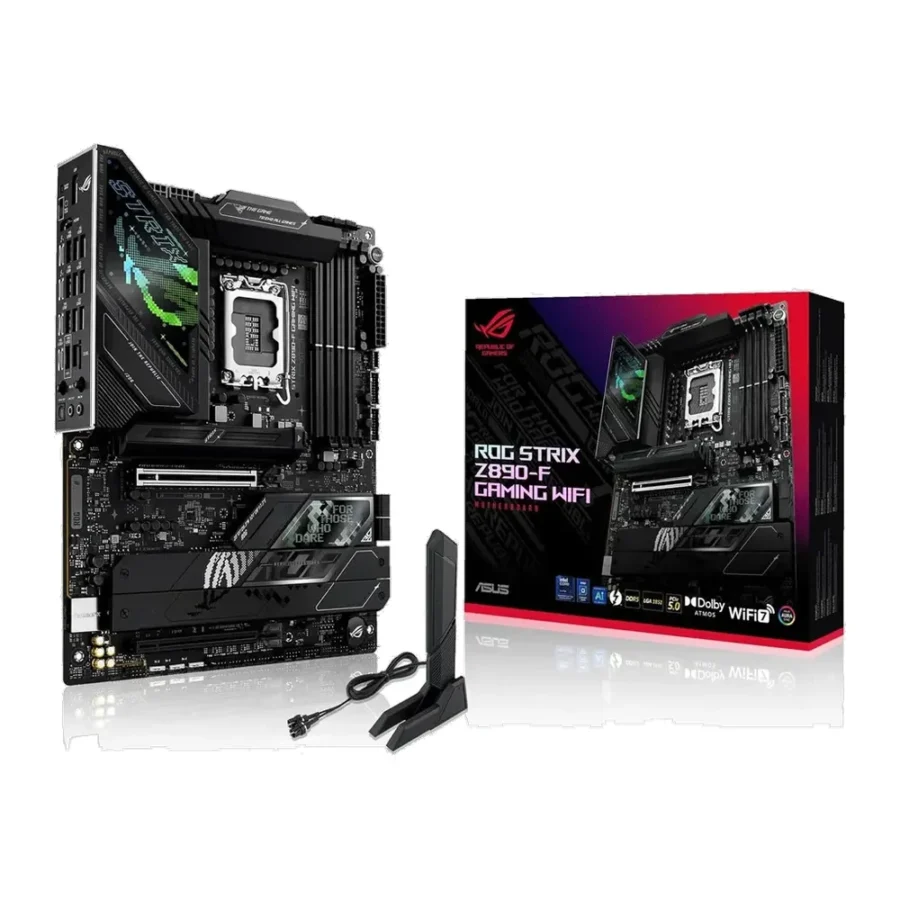
Description
ASUS ROG Strix Z890-F Gaming WiFi DDR5 Intel LGA1851 ATX Motherboard :
Buying Guide & Review
Intel’s move to the LGA1851 socket and Core Ultra Series 2 processors reset the desktop board market, and anyone building a new Intel PC now needs a fresh motherboard. The ASUS ROG Strix Z890-F Gaming WiFi DDR5 Intel LGA1851 ATX Motherboard is one of the most complete answers in the upper-mid range, pairing the unlocked Z890 chipset with serious power delivery and a long list of connectivity.
Five M.2 slots, PCIe 5.0 graphics, Wi-Fi 7 and Thunderbolt 4 make it a board that can handle gaming, content work and heavy storage in one system. Here is what that means for a buyer in Pakistan.
1. Why the ASUS ROG Strix Z890-F Is Worth a Look
The New Intel Platform
LGA1851 is Intel’s socket for Core Ultra Series 2 desktop processors. Older 12th, 13th and 14th Gen chips will not fit, so this is a board for a brand-new Intel build rather than an upgrade of an existing LGA1700 system.
Z890 Unlocks Tuning
Z890 is Intel’s enthusiast chipset for this generation. It supports tuning of unlocked processors and memory, and it offers the widest connectivity, which is why it is the natural pairing for a K-series Core Ultra chip.
2. Power Delivery & Build
16+2+1+2 Power Stages
The board uses a 16+2+1+2 power stage layout. That generous design spreads the current across many phases so the processor gets steady, clean power during long gaming sessions, compiles or video exports.
ProCool II Power Connectors
ASUS ProCool II connectors are built to seat firmly and make solid contact with your PSU cables. A secure connection matters for a high-end CPU, and it is one less thing to worry about in a warm room where parts already run hotter.
3. ASUS ROG Strix Z890-F Specs Explained
DDR5 Only
Z890 boards run DDR5 memory. For gaming, a matched 2 x 16GB XMP kit is the comfortable starting point, while 2 x 32GB suits streaming, editing and heavy multitasking.
Five M.2 Slots
With five M.2 slots, storage is almost unlimited for a home PC. Keep your operating system on one drive, games on another, and dedicate the rest to projects, recordings or backups. It also means you can retire noisy old hard drives.
PCIe 5.0 x16
The primary graphics slot is PCIe 5.0 x16, giving today’s most powerful GPUs full bandwidth and leaving headroom for future cards.
4. Tuning & Everyday Performance
AI Overclocking
ASUS AI Overclocking studies your specific CPU and cooling, then suggests tuned settings. It is an easy way to get extra performance from an unlocked Core Ultra processor without trial-and-error voltage changes.
Gaming Stability
A motherboard does not add frame rates by itself, but a weak one can hold a strong CPU back. Robust power stages and a full-speed graphics slot let the processor and GPU run as intended, which is what keeps gameplay smooth.
5. Wi-Fi 7, Thunderbolt 4 & USB-C
Wi-Fi 7 Built In
Wi-Fi 7 is onboard and works with older routers too. For competitive gaming, a LAN cable remains the most reliable option, but wireless gives you flexibility when the router is in another room.
Thunderbolt 4
Thunderbolt 4 support opens the door to fast external SSDs, docks and professional peripherals. Freelancers and creators who move large files between machines will appreciate it, and the extra USB Type-C connectivity means modern phones, cameras and drives plug straight in without hunting for adapters.
6. Pakistan Market Perspective
Cooling for Hot Summers
Core Ultra K-series processors deserve a strong cooler, especially here in summer. Budget for a quality 240mm or 360mm liquid cooler or a large tower cooler, and choose a case with good front intake.
Power and Backup
A high-end build needs a quality PSU and a UPS sized properly for the whole system. Stable power through load-shedding switchovers protects both the board and the storage connected to it.
7. ASUS ROG Strix Z890-F Price in Pakistan & Value
Positioning
The Strix Z890-F sits in the upper-middle of the Z890 range. It offers much of what the flagship boards do, including five M.2 slots, Thunderbolt 4 and Wi-Fi 7, at a less extreme price.
Value Verdict
When you compare the ASUS ROG Strix Z890-F price in Pakistan against buying a cheaper board and adding Wi-Fi, Thunderbolt and storage cards later, the all-in-one approach makes sense. It is backed by a 1 year warranty.
8. Who Should Buy the ASUS ROG Strix Z890-F?
Perfect For
Builders choosing an unlocked Core Ultra Series 2 processor, creators who need Thunderbolt 4 and lots of NVMe storage, and gamers who want a premium but sensible Intel board.
Skip It If
You are using a locked, budget Core Ultra chip and do not need tuning. A B860 board would be more cost-effective in that case.
Conclusion
The ASUS ROG Strix Z890-F Gaming WiFi DDR5 Intel LGA1851 ATX Motherboard gives Intel’s newest desktop platform a well-equipped home. Its 16+2+1+2 power stages with ProCool II, DDR5, PCIe 5.0 x16, five M.2 slots, Wi-Fi 7 and Thunderbolt 4 cover everything a high-end gaming or creator PC needs.
For anyone starting fresh on LGA1851 and wanting a board that will not need extra cards later, this Strix is a confident choice.
FAQs
1. Which processors does the ASUS ROG Strix Z890-F support?
It uses the Intel LGA1851 socket and supports Intel Core Ultra Series 2 desktop processors.
2. Can I use a 13th or 14th Gen Intel CPU?
No. Those processors use the older LGA1700 socket and are not compatible with this board.
3. How many M.2 slots does it have?
There are five M.2 slots for NVMe storage.
4. Does it have Wi-Fi and Thunderbolt?
Yes. Wi-Fi 7 and Thunderbolt 4 are both supported.
5. What is the ASUS ROG Strix Z890-F price in Pakistan?
Prices change with the market and exchange rate. See the current ASUS ROG Strix Z890-F price in Pakistan on this page, or message MHK Tech Zone on WhatsApp for the latest rate.
Reviews
There are no reviews yet.