Description
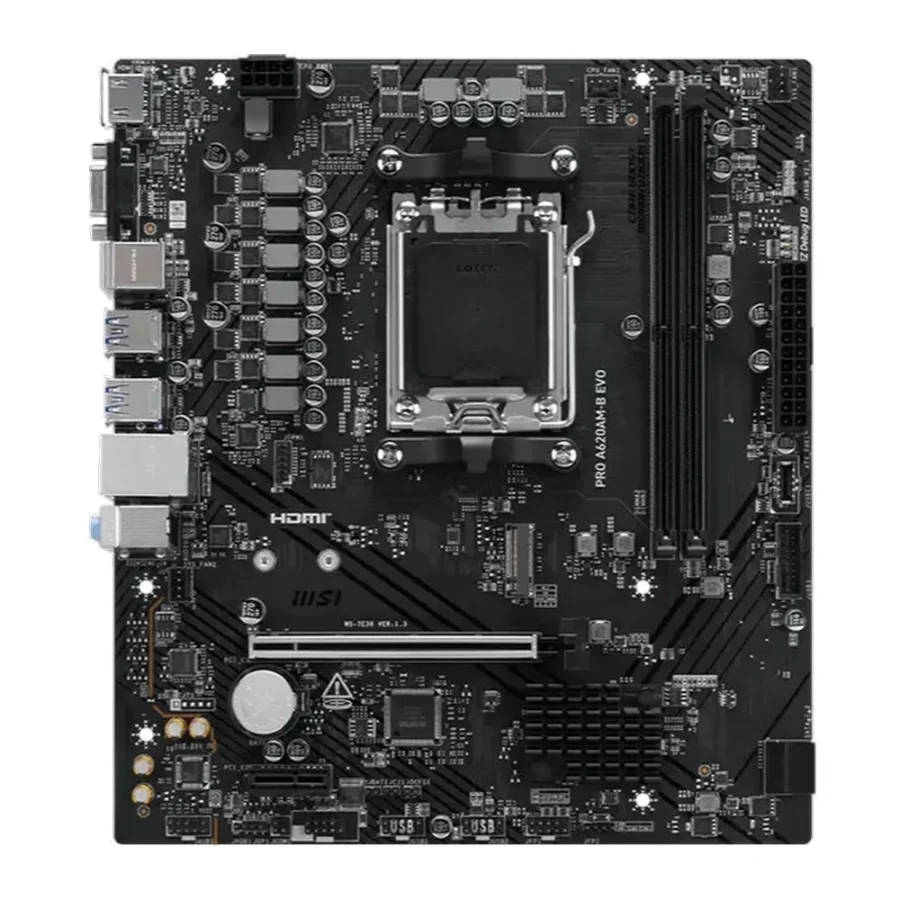
MSI PRO A620AM-B EVO DDR5 AMD AM5 microATX Motherboard :
Buying Guide & Review
Budget motherboards used to mean old sockets, slow storage and a network port stuck in the past. The MSI PRO A620AM-B EVO DDR5 AMD AM5 microATX Motherboard takes a different line. It sits at the affordable end of AMD’s AM5 range, yet it still brings a PCIe 4.0 graphics slot, a Gen4 NVMe slot and 2.5G networking, the kind of connections that once belonged to pricier boards.
MSI’s PRO series is aimed at dependable, no-drama systems, and this EVO revision continues that approach. If you are putting together a first AM5 PC, an office machine or a budget gaming rig, here is what the board gets right and where its limits are.
1. What Makes the MSI PRO A620AM-B EVO Worth a Look
Three Ryzen Generations on One Board
The AM5 socket supports Ryzen 7000, Ryzen 8000 and Ryzen 9000 desktop processors. That breadth is the main reason to choose AM5 over an older platform: you can buy an affordable chip now and still have a sensible processor upgrade waiting down the line.
The A620A Chipset Explained
A620A belongs to AMD’s entry-level chipset family. It is designed for builders who run their processor at stock settings and would rather put their budget into the graphics card, memory or storage. CPU overclocking is not part of the package, but everything a typical gaming or work PC needs is.
2. Layout & Build
A Tidy mATX Board
The mATX size keeps the board compact enough for small towers while leaving room for a full-length graphics card and a spare expansion slot. It suits the kind of compact cases many home users prefer for a desk corner or a shared room.
MSI PRO Series Approach
PRO boards are known for a clean, practical design rather than flashy lighting. That makes this one a good match for offices, study PCs and gamers who prefer a quiet, understated build.
3. MSI PRO A620AM-B EVO Specs Explained
DDR5 Up to 128GB and 6800+ MT/s
Two DDR5 slots run in dual channel and accept up to 128GB in total. With an overclocked memory kit the board is rated for 6800+ MT/s, well above basic DDR5 speeds. For most people, a 2 x 16GB kit is the right starting point, with 2 x 32GB available later for heavier workloads.
PCIe 4.0 x16 and a PCIe 3.0 x1 Slot
The main PCIe 4.0 x16 slot is where the graphics card goes, and it has the bandwidth any current mainstream GPU needs. A secondary PCIe 3.0 x1 slot is useful for a Wi-Fi card, a capture card or a sound card.
Gen4 NVMe and SATA Storage
One M.2 slot runs at Gen4 x4 for a fast NVMe SSD, and two SATA 6G ports cover an extra SSD or a hard drive for bulk storage. It is a simple layout, but it covers the common setup of a fast boot drive plus a larger data drive.
4. Gaming & Everyday Use
Letting the Rest of the PC Do Its Job
A motherboard does not add performance on its own; its role is to let the processor, memory and GPU run as intended. With PCIe 4.0 for the graphics card and dual-channel DDR5, this board keeps a mainstream gaming build running without bottlenecks in the places that matter.
Sensible Processor Choices
A Ryzen 5 or a Ryzen 8000 series APU is the natural partner here. You can go higher, but a board at this level is designed around mainstream chips, and that pairing keeps temperatures and power delivery comfortable.
5. Networking & Connectivity
Realtek 2.5G LAN
The onboard Realtek 2.5G Ethernet controller is a step up from the Gigabit ports common on entry boards. For online gaming, a wired connection keeps latency steady, and the faster link helps with large transfers across a home network or NAS.
Adding Wireless Later
There is no built-in Wi-Fi, but the spare PCIe 3.0 x1 slot makes it easy to add a wireless card if the router is in another room.
6. Pakistan Market Perspective
Plan Around Heat and Power
Summer temperatures and irregular power are part of every build conversation here. Pair the board with a quality power supply, a UPS suited to your load-shedding schedule and a case with decent airflow so the system stays stable through the hottest months.
Room to Grow on a Tight Budget
Because it runs Ryzen processors from three generations, the board lets you start small and upgrade in stages, which is how most Pakistani gamers and freelancers prefer to build.
7. MSI PRO A620AM-B EVO Price in Pakistan & Value
Entry Price, Modern Features
Among AM5 boards, this one sits near the bottom of the price range. What sets it apart from other entry boards is the 2.5G LAN and a DDR5 overclocking rating that goes well beyond basic speeds.
Is the Saving Worth It?
When you weigh the MSI PRO A620AM-B EVO price in Pakistan against a B650 board, the question is simple: do you need CPU overclocking, a second M.2 slot or four memory slots? If not, the money saved here is better spent on a stronger graphics card or a bigger SSD.
8. Who Should Buy the MSI PRO A620AM-B EVO?
A Great Fit For
First-time AM5 builders, budget gamers, home office and study PCs, and anyone who wants a reliable, understated board with modern networking and a clear upgrade path.
Consider Another Board If
You want to overclock your processor, need multiple NVMe drives, want built-in Wi-Fi or plan to run a high-end Ryzen 9 at full load for long periods. A B650 or higher board is the better match for that.
Conclusion
The MSI PRO A620AM-B EVO DDR5 AMD AM5 microATX Motherboard shows how much an entry-level AM5 board can offer. Ryzen 7000 to 9000 support, dual-channel DDR5 up to 128GB with 6800+ MT/s overclocked kits, a PCIe 4.0 x16 slot, a Gen4 x4 M.2 slot and Realtek 2.5G LAN make it a solid base for a modern budget PC.
It will not satisfy enthusiasts looking to tune every setting, but for buyers who want a dependable platform at a sensible price, it is a smart place to start.
FAQs
1. Is the MSI PRO A620AM-B EVO good for gaming?
Yes, for mainstream builds. It offers a PCIe 4.0 x16 slot for your graphics card, dual-channel DDR5 and fast Gen4 NVMe storage, which is all a typical gaming PC needs.
2. Which Ryzen processors are supported?
It supports AMD Ryzen 9000, 8000 and 7000 series processors on the AM5 socket.
3. What is the maximum RAM supported?
The board has two DDR5 slots with support for up to 128GB in dual channel, and overclocked kits rated at 6800+ MT/s.
4. How many storage drives can I connect?
You can install one Gen4 x4 M.2 NVMe SSD and two SATA 6G drives, such as a 2.5-inch SSD or a hard drive.
5. What is the MSI PRO A620AM-B EVO price in Pakistan?
Prices shift with the exchange rate and supply. Check the current MSI PRO A620AM-B EVO price in Pakistan on this page or message MHK Tech Zone on WhatsApp for the latest rate.


Reviews
There are no reviews yet.